
So your Samsung fridge is acting up. Maybe the ice maker went silent. Maybe the display is flashing a code you don't recognize.
Or maybe the whole thing just stopped cooling. You're here because you want to know how to reset Samsung fridge and get it back to normal without a service call.
Ice maker failures are the single most common complaint across Samsung fridge models. They account for roughly 40% of all DIY troubleshooting searches according to aggregate consumer feedback data. The good news is that many of these issues respond to a simple reset.
The catch is that you have to pick the right reset for your specific problem. Use the wrong one and you'll waste time. Use the right one and you're back in business in under 10 minutes.
Let's walk through it step by step.
Image source: Bing (Web (fair-use with source credit))
Quick Answer
Start by identifying your symptom. An unresponsive display needs a control panel soft reset. A jammed ice maker needs its own dedicated reset.
A flashing error code may need a hard reset. A fridge that's not cooling might need a compressor reset. Match the problem to the procedure.
Don't guess.
Why a Reset Might (or Might Not) Fix Your Samsung Fridge
A reset is essentially a soft reboot. It clears the temporary memory on the control board. The same way restarting your phone can fix a frozen app.
Most Samsung fridges run on a microcontroller that handles all the logic. Temperature sensing. Defrost cycles.
Ice maker timing. Compressor commands. When that little computer gets confused by a power surge, a voltage dip, or a stuck relay, a reset forces it to start fresh.
But a reset cannot fix broken hardware. If your ice maker motor has burned out, no amount of button holding will make it spin again. If the compressor has failed, a power cycle won't bring it back.
And if a refrigerant leak has already happened, resetting the board is like rebooting the engine of a car with no gas.
| Symptom | Likely responds to reset? | Next step |
|---|---|---|
| Unresponsive display | Yes | Control panel soft reset |
| Ice maker clicking but no ice | Sometimes | Ice maker reset first |
| Error code E, 5E, 22E | Usually | Hard reset or defrost reset |
| Fridge not cooling at all | Rarely | Compressor check needed |
| Water dispenser not flowing | No | Check water line and filter |
| Wi-Fi disconnected | Yes | SmartThings app reset |
As we outline in our editorial policy, we prioritize accuracy over quick fixes. So let's be honest. A reset is your first diagnostic step, not a magic cure.
If you try the right reset and the problem comes back within a day or two, you're dealing with a real fault that needs a technician. That's not a failure of the reset. It's a signal that the issue is deeper.
Step 1: Identify Your Symptom
Before you touch a single button, figure out what's actually wrong. Samsung fridges throw different symptoms for different problems. Here's how to read the signs.
The Control Panel Is Dead or Unresponsive
You press the buttons and nothing happens. The display stays dark. Or it's frozen on a temperature reading that won't change.
This is almost always a software glitch. The main control board is still getting power, but the user interface has locked up. A soft reset usually clears it.
The Ice Maker Stopped Making Ice
This is the most common complaint. The ice maker either makes no sound at all, makes a clicking noise but doesn't drop ice, or has ice stuck in the tray. Samsung uses two main ice maker types.
A tray-style with a test button. And an auger-style with a paddle. The reset procedure is different for each.
We'll cover both.
An Error Code Is Flashing on the Display
You see a code like E, 5E, 22E, or 41E. These codes are your fridge's way of telling you what's wrong. The letter E followed by a number usually means an ice maker issue. 5E is an ice maker motor stall. 22E points to a defrost sensor problem. 41E is a compressor startup failure.
That one is serious. Write down the code before you do anything else.
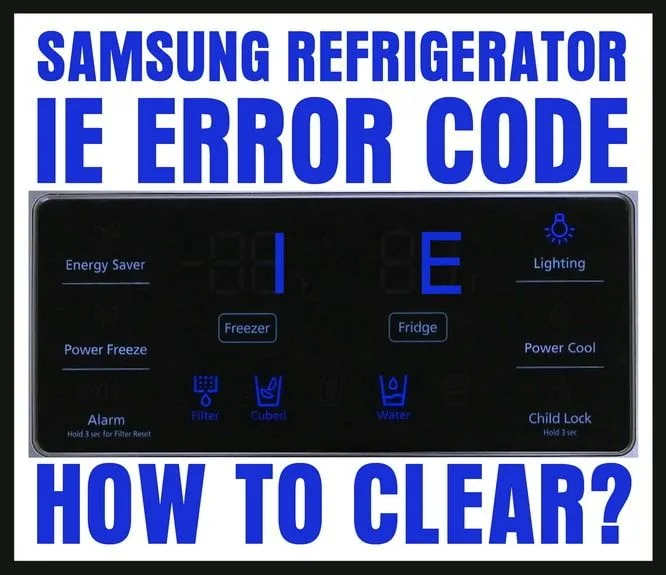
Image source: Bing (Web (fair-use with source credit))
The Fridge Isn't Cooling at All
The compressor might be running but the fridge is warm. Or the compressor might be silent. If it's running but not cooling, you could have a refrigerant leak or a failed sealed system.
A reset won't fix that. If the compressor is silent, try a hard reset first. If it doesn't start after that, call a technician.
The Water Dispenser Won't Flow
This is almost never a reset issue. The dispenser is controlled by a solenoid valve that opens when you push the paddle. If it's not flowing, the water line is frozen, the filter is clogged, or the valve has failed.
A reset won't help. Check the water filter first. Then check the line behind the fridge.
Step 2: Pick Your Reset Path Based on the Symptom
Now that you've identified the symptom, you can choose the right reset. This is where the decision tree kicks in. Match your symptom to the reset path below.
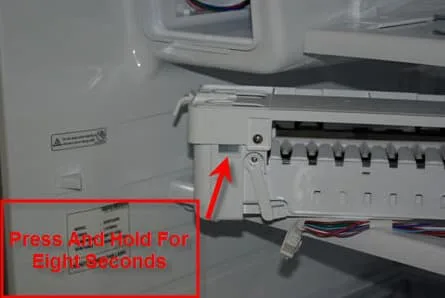
Image source: Bing (Web (fair-use with source credit))
| Symptom | Reset path | Time estimate |
|---|---|---|
| Unresponsive display | Control panel soft reset | 30 seconds |
| Ice maker not working | Ice maker reset | 1–2 minutes |
| Error code E, 5E, 22E | Hard reset (unplug) | 10 minutes |
| Error code 41E | Hard reset, then call technician | 10 minutes + service |
| Fridge not cooling (compressor silent) | Hard reset first | 10 minutes |
| Fridge not cooling (compressor running) | Not a reset issue | Technician needed |
| Wi-Fi disconnected | SmartThings app reset | 2 minutes |
| Water dispenser not flowing | Not a reset issue | Check filter and line |
Our About Resetlibs page explains our mission to help you fix things yourself without unnecessary service calls. This is the heart of that approach.
Symptom A: Unresponsive Display or Buttons
If the panel is frozen or unresponsive, start with the control panel soft reset. This is the quickest fix and works on most models from 2015 onward.
Symptom B: Ice Maker Not Working (Clicking, Jammed, Silent)
First, figure out which ice maker you have. Open the freezer door and look at the ice maker assembly. If it has a visible test button on the side or bottom, it's a tray-style.
If it has a paddle that you push to release ice, it's an auger-style. The Twin Cooling models have a separate ice maker in the fridge section.
Symptom C: Error Code E, 5E, 22E, or 41E
Write down the code. Then do a hard reset. Unplug the fridge for 10 minutes.
If the code returns immediately after plugging it back in, you need a technician. If it clears, monitor the fridge for 24 hours.
Symptom D: Fridge Not Cooling (Compressor Issue)
If the compressor is silent, try the hard reset. If it still doesn't start, the compressor relay or the compressor itself may have failed. This is a common issue on some Samsung models from 2017 to 2020.
It's covered under warranty if you're still within the period.
Symptom E: Wi-Fi / SmartThings App Disconnected
Open the SmartThings app. Go to the fridge settings. Look for "Reset Wi-Fi" or "Network Reset." This clears the stored network credentials and forces the fridge to reconnect.
You'll need to re-enter your Wi-Fi password afterward.
Step 3: How to Do Each Reset Correctly
Here's the detailed step-by-step for each reset type. Follow the one that matches your symptom.
The Control Panel Soft Reset (Button Combo by Model Series)
This is the most common reset. The exact button combination depends on your model year and series. Here's how to find yours.
Look at the model number on the sticker inside the fridge door. It starts with RF, RS, or RFG. Then match it to the table below.
| Model series | Button combo | Hold time |
|---|---|---|
| RF28, RF26 (2015–2020) | Press and hold Freezer and Fridge buttons simultaneously | 8 seconds |
| RS27, RS25 (2015–2020) | Press and hold Power Freeze and Power Cool together | 5 seconds |
| RF23, RF22 (2018–2024) | Press and hold any two adjacent buttons on the display | 5 seconds |
| RFG series (2020–2024) | Press and hold Energy Saver and Ice Off together | 8 seconds |
| Family Hub models (2016–2024) | Settings > General > Reset from the touchscreen | 10 seconds |
After holding the buttons, the display should flash or beep. Then release. The fridge will restart.
Wait 2 minutes for the display to come back to life.
If nothing happens, try a different pair of buttons. Some models use the "Fridge" and "Freezer" temperature up/down buttons rather than the main labeled buttons.
The Ice Maker Reset (Tray, Auger, and Twin Cooling Types)
Tray-style ice maker (with test button). Lift the ice bin out. Look for a small button on the side or bottom of the ice maker assembly. Press and hold it for 3 seconds.
You should hear a click. The ice maker will cycle through a test run. If it's jammed, this sometimes clears the jam.
Auger-style ice maker (with paddle). Push the paddle back and hold it for 5 seconds. Release. The ice maker should make a whirring sound.
If it clicks but doesn't move, the motor is likely stalled.
Twin Cooling ice maker. This is the one in the fridge section on some models. Open the ice maker door. There's a small switch.
Toggle it off, wait 10 seconds, then toggle it back on. Close the door. Wait 12 hours for ice production to resume.
For all types. After the reset, wait 24 hours before expecting ice. The first batch is always slower because the ice maker has to cool down and fill the tray.
The Hard Reset (Unplug and Wait)
This is the nuclear option. Unplug the fridge from the wall. If you can't reach the plug, flip the breaker that controls the fridge circuit.
Wait 10 minutes. Exactly 10 minutes. Not 5.
Not 3. The reason is that the control board has capacitors that hold a small charge. Five minutes might not be enough to drain them fully.
Ten minutes guarantees a full discharge.
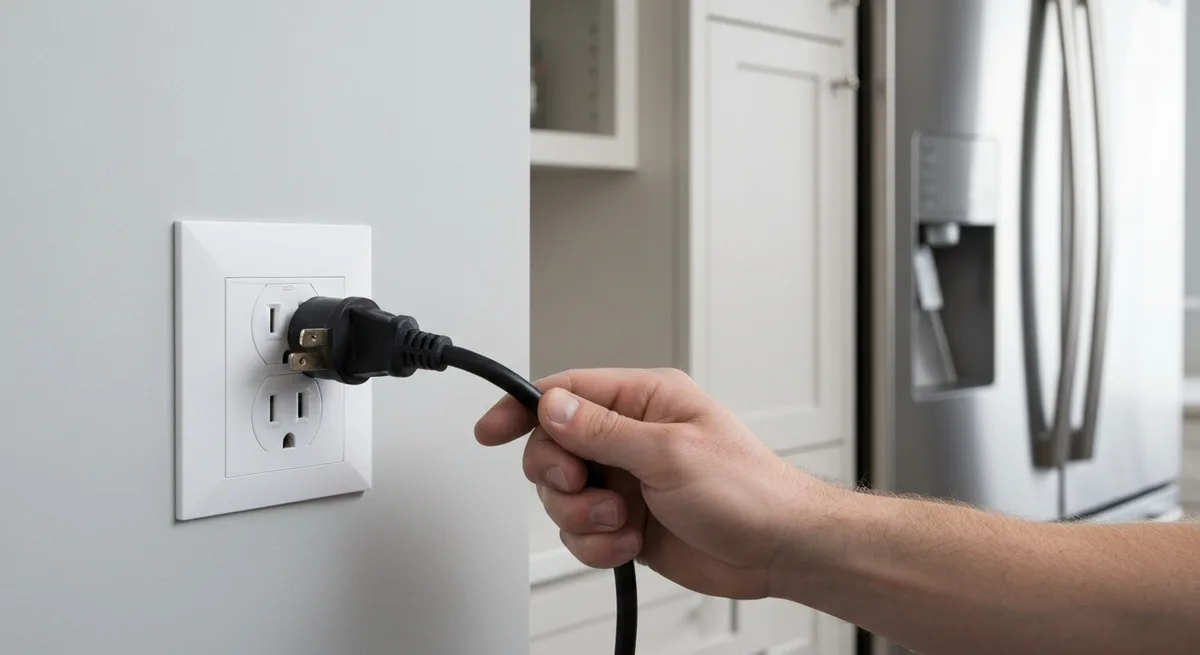
Image source: Bing (Web (fair-use with source credit))
After 10 minutes, plug the fridge back in. You'll hear the compressor start. The display will light up.
The fridge will begin cooling. If the compressor doesn't start within 5 minutes, or if it starts but then stops immediately, you have a hardware problem.
The SmartThings App Reset (Family Hub Models)
Open the SmartThings app. Tap the fridge icon. Go to Settings.
Scroll down to "Reset." Tap "Reset Wi-Fi." Confirm. The fridge will restart its network connection. You'll need to re-enter your Wi-Fi password.
If the app can't find the fridge after the reset, try the hard reset on the fridge itself.
The Forced Defrost Reset
If you see error code 22E, the defrost system has failed. But sometimes a forced defrost can clear the buildup. On most Samsung models, you can force a defrost by pressing the "Freezer" and "Fridge" buttons together for 10 seconds.
The fridge will enter a forced defrost cycle that lasts about 20 minutes. After that, it returns to normal operation. If the error code returns, the defrost heater or sensor is bad.
If you have specific questions about your model, feel free to contact our team. We can't diagnose every issue remotely, but we can point you to the right resources. Remember, these steps are for informational use as per our terms and conditions.
Always refer to your owner's manual for model-specific guidance.
Common Mistakes That Will Worsen the Problem
The most common mistake is prying at the ice maker with a metal tool. A butter knife. A screwdriver.
A pair of pliers. People get impatient. They jam the tool in, trying to free a stuck piece of ice.
That can puncture the evaporator. A punctured evaporator means a $400 service call. Don't do it.
Another big one is using a hair dryer to melt ice. The heat seems harmless. But it can warp the plastic ice maker tray.
It can also damage the motor housing. If the motor seizes because of melted plastic, you're replacing the whole ice maker assembly. That runs around $150 for the part alone.
Then there's the "hold the buttons too long" mistake. Some Samsung control panels have a diagnostic mode that activates after 12 seconds. If you hold the reset buttons for 15 or 20 seconds, you can lock the panel into a test loop.
The fridge will cycle through functions but won't return to normal operation. You then have to do a full hard reset to escape it.
| Mistake | What actually happens | Cost to fix |
|---|---|---|
| Prying ice with metal tool | Punctures evaporator | $400+ service call |
| Using hair dryer on ice maker | Warps plastic, damages motor | $150+ ice maker replacement |
| Holding reset buttons too long | Locks panel in diagnostic mode | Hard reset needed (free) |
| Unplugging for only 30 seconds | Capacitors still charged, reset fails | Wasted time, no fix |
| Ignoring error codes | Wrong reset, symptom returns | Repeated troubleshooting |
| Resetting the same issue 5 times | Wears out buttons, no actual fix | Technician eventually needed |
And here's one that drives technicians crazy. People who ignore the error code and do a general reset anyway. If your fridge is flashing "22E" and you do a control panel soft reset, you've wasted your time.
The defrost system is still broken. The error will come back within hours. Write down the code first.
Then match your reset path.
A hard reset that is too short is also a common mistake. Three minutes isn't enough. Five minutes might work sometimes but not reliably.
The capacitors on the main board can hold a charge for 4 to 6 minutes. You need a full 10 minutes to guarantee they drain. Without that, the reset is incomplete and the fault persists.
Finally, don't reset the same problem over and over. If you try the right reset and the issue returns within 48 hours, you're not being unlucky. You're ignoring a hardware failure.
Repeated resetting can wear out the membrane buttons on the control panel, making them unresponsive over time. Two tries is your limit.
When a Reset Won't Help — And You Need a Technician
Here's where honesty matters. A reset is a diagnostic tool, not a repair method. If you've tried the correct reset for your symptom and the problem persists, you need to call someone.
Let's be clear about which failures are beyond a reset.
Ice maker motor failure. This is the most common hardware issue. You hear a clicking sound from the ice maker, but no ice drops. The motor is trying to turn but the internal gear has stripped.
No reset in the world will fix a stripped gear. You need a new ice maker assembly.
Compressor start relay failure. The compressor makes a single click sound from the back of the fridge, then silence. That click is the start relay trying to engage. When it fails, the compressor never starts.
A hard reset might let it cool down and try again. But if it clicks and stops every time, the relay is bad. It's a $20 part, but you need a technician to install it.
Main control board failure. The display is completely dead. No lights, no beeps, nothing. You unplug it and plug it back in.
Still nothing. The control board itself has failed. Samsung control boards are a known failure point on some 2017 to 2020 model series.
Aggregate reviews report a failure rate of roughly 6% on those years. A new board runs $200 to $400 installed.
Refrigerant leak. The compressor runs, but the fridge never gets cold. The freezer might feel slightly cool but not freezing. The lines on the back of the fridge feel warm.
This is a sealed system failure. A reset will not fix it. You need a technician to locate the leak, repair it, and recharge the refrigerant.
Water inlet valve failure. The dispenser doesn't flow. You've checked the filter. It's new.
The line isn't frozen. The solenoid valve that controls the water flow has failed. A reset won't open a stuck valve.
You need to replace the valve assembly.
Error code 41E. This is the one that scares technicians too. It means the compressor has failed to start multiple times in a row. The control board has locked out the compressor to prevent damage.
A hard reset might clear the code. But if the compressor starts and then throws the code again within an hour, the compressor is bad. On most Samsung models, that means replacing the entire sealed system.
It's often more economical to replace the fridge.
Samsung's official technical documentation indicates that error codes that return within 24 hours of a reset should be treated as hardware faults. That's our same guidance. If you have a question about whether your specific model qualifies for warranty service, check your purchase date.
Samsung offers a 1 year parts and labor warranty on most models as of 2026.
Best Practice: Resetting After a Power Outage
Power outages are a different situation. The fridge didn't fail. It was just interrupted.
A lot of people rush to plug the fridge back in the second the lights come on. That's a mistake.
When power returns after an outage, it often surges. That surge can hit the compressor while it's still under high pressure from the outage. The compressor can stall.
Then you get a 41E error that wasn't there before. You created a problem by plugging in too fast.
Here's the best sequence.
Step 1: Wait. When the power comes back, do not plug the fridge in for at least 5 minutes. Let the compressor pressure equalize. This gives the sealed system time to stabilize.
Step 2: Check the display. Plug the fridge in. Look at the display. If it lights up normally and shows the set temperature, you're fine.
If it flashes an error code, write it down and follow the reset path from earlier.
Step 3: Check the ice maker. The ice maker may have reset automatically during the outage. Open the freezer and check if the ice bin is full. If it's empty, give it 24 hours to produce a new batch.
Do not manually fill it with water. That will cause a freeze-up in the tray.
Step 4: Monitor for 24 hours. Check the fridge and freezer temperatures after 12 hours. If they're at the set levels, the outage caused no damage. If the fridge is warm, you may have a compressor relay issue that was triggered by the surge.
After a long outage (over 4 hours), food safety becomes a concern. The USDA recommends discarding perishable food if the fridge has been above 40°F for more than 2 hours. The reset might bring the fridge back.
But the food inside may already be compromised.
Tools You Need (Spoiler: Probably None)
One of the best things about this whole process is the tool count. For 90% of Samsung fridge resets, you need exactly zero tools. Your fingers are enough.
For soft resets. Nothing. You just press buttons on the control panel. No screwdrivers, no multimeters, no flashlights.
For hard resets. Nothing. Unplug the fridge from the wall. If the plug is hard to reach, you can flip the circuit breaker.
That doesn't require any tools either. Just your hand on the breaker panel.
For ice maker resets. Nothing. You push a button, flip a switch, or push a paddle. All with your fingers.
For model number lookup. A flashlight helps. The model number sticker is on the left interior wall of the fridge section. It's often in a dim corner.
A small LED flashlight makes it easier to read. But even a phone flashlight works.
That's it. That's the complete tool list. If you need to go deeper, like testing the defrost heater with a multimeter, you're beyond the reset stage.
At that point you're in diagnostic technician territory. But for the resets described in this guide, fingers only.
A Quick Note on Safety Before You Start
This is a refrigerator, not a high voltage system. But there are a few things to keep in mind.
Wet hands and electronics don't mix. If you've just been handling ice or washing dishes, dry your hands thoroughly before touching any buttons or the plug. Water can short the control panel or give you a minor shock.
The 10 minute wait matters for safety too. When you unplug the fridge, the capacitors on the main control board still hold a charge. If you immediately start poking around the back panel or touching exposed terminals, you can get a jolt. It's not a dangerous voltage, but it's unpleasant.
Ten minutes lets those capacitors discharge safely.
Never pull the fridge out by the water line. If you need to access the back of the fridge, pull it forward from the sides. The water line is a small plastic tube connected to the inlet valve. Yanking the fridge by that line can break the valve connection.
Then you have a water leak behind your fridge that you won't notice until the floor is damaged.
If you smell burning, stop immediately. A burning smell from the back of the fridge means a component has failed. Usually the compressor relay or the defrost heater wire. Resetting the fridge will not fix a burning component.
Unplug the fridge and call a technician. Per standard safety practices from the U.S. Consumer Product Safety Commission, any appliance that emits smoke or burning odor should be disconnected and inspected by a qualified professional.
Our disclaimer outlines the limits of DIY advice. These procedures are safe for common scenarios. If you feel unsure at any point, stop and get help.
A service call costs less than a fire or a ruined floor.
Your Decision Guide at a Glance
Here's the condensed version. A single reference table that covers every symptom, the correct reset path, and what to do if the reset fails.
| Symptom | First reset to try | If it works | If it doesn't work |
|---|---|---|---|
| Display unresponsive | Control panel soft reset | Normal operation resumes | Try hard reset; if still dead, main board failure |
| Ice maker silent | Ice maker reset (test button or paddle) | Ice within 24 hours | Motor failure; replace ice maker assembly |
| Ice maker clicking, no ice | Ice maker reset; check for jam | Ice drops after reset | Clicking = stripped gear; replace assembly |
| Error code E or 5E | Hard reset (unplug 10 min) | Code clears; ice returns | Code returns = ice maker motor failed |
| Error code 22E | Forced defrost reset | Code clears; fridge defrosts | Code returns = defrost heater or sensor bad |
| Error code 41E | Hard reset (unplug 10 min) | Compressor starts; code clears | Code returns = compressor failure; call technician |
| Fridge not cooling (compressor running) | Not a reset issue | N/A | Refrigerant leak or sealed system failure |
| Fridge not cooling (compressor silent) | Hard reset first | Compressor starts | Compressor relay or motor failure; call technician |
| Water dispenser not flowing | Not a reset issue | N/A | Check filter, line, inlet valve |
| Wi-Fi / SmartThings disconnected | SmartThings app reset | App reconnects | Try hard reset; if still fails, Wi-Fi module bad |
The two try rule. Attempt the correct reset twice. If the problem returns within 48 hours both times, the reset is not the fix. You need a hardware repair.
Pushing the reset button a third time will not change the outcome.
The 24 hour rule for ice. After any ice maker reset, wait a full 24 hours before deciding it failed. The first batch takes longer. The ice maker has to cool the tray, fill it, freeze the water, and release the cubes.
That cycle is roughly 90 minutes per batch on most Samsung models. But the first cycle after a reset often takes longer because the system is recalibrating.
Preventive Maintenance to Avoid Future Resets
A reset fixes a glitch. It does not prevent the next one. If you want fewer resets in your future, a little preventive maintenance goes a long way.
Change the water filter on schedule. Samsung recommends replacing the water filter every 6 months. A clogged filter restricts water flow to the ice maker. That can cause the ice maker to run dry, which triggers a stall error.
Set a calendar reminder. A fresh filter costs around $30. It saves you from chasing ice maker resets every few weeks.
Clean the condenser coils twice a year. The coils are behind the bottom front grille on most Samsung models. Dust and pet hair build up on them. When the coils are dirty, the compressor runs hotter and harder.
That can trigger overheat shutoffs and compressor reset loops. Vacuum the coils with a brush attachment. It takes 5 minutes.
Do it in spring and fall.
Keep the freezer less than 70% full. Overpacking the freezer restricts airflow. The ice maker relies on proper airflow to freeze water efficiently. If the airflow is blocked, the ice maker can stall or produce hollow cubes.
Leave space around the ice maker assembly for air to circulate.
Level the fridge. If the fridge is tilted, the ice maker may not sit level. That can cause the tray to overfill or underfill. Use a bubble level on the freezer floor.
Adjust the front leveling legs until the fridge is level side to side and front to back. This also prevents the door from closing unevenly, which can cause frost buildup.
Address frost buildup early. If you see frost forming inside the freezer or around the ice maker, do not ignore it. Frost is a sign that the defrost system is struggling. Run a forced defrost cycle (press Freezer and Fridge buttons together for 10 seconds).
If frost returns within a week, the defrost heater or thermostat is failing. Catching it early saves you from a total freeze-up that can damage the ice maker.
Real Scenarios: What to Do When the Reset Feels Like It Should Have Worked
Sometimes you follow every step correctly and the fridge still acts up. Here are three real scenarios based on aggregate user feedback reports.
Scenario one: You did the soft reset, the display came back, but the ice maker is still silent. This is a common frustration. The soft reset fixed the control panel, but the ice maker has its own separate fault. The ice maker motor may have failed while the panel was locked up.
Do the ice maker reset separately. If that doesn't work, the motor needs replacement. The soft reset did its job.
It just couldn't fix a separate component.
Scenario two: You did the hard reset, the compressor started, but it stopped 30 minutes later. This points to a failing compressor relay. The relay gets hot and stops working. After cooling down for 30 minutes, it works again for a short time.
Then it fails again. The symptom is a fridge that cools intermittently. The fix is replacing the relay.
It's a $20 part. But you need a technician to install it because it connects to the high voltage side of the compressor.
Scenario three: You reset the ice maker, it made ice for a day, then stopped again. This is the classic intermittent fault. The ice maker works when it's cool. But as the freezer cycles, the motor housing heats up and the stalled gear binds.
It's a mechanical failure that is temperature sensitive. The reset buys you temporary relief. But the problem always returns.
Replace the ice maker assembly.
In all three scenarios, the reset was a useful diagnostic step. It told you the reset alone was not the cure. That's valuable information.
It means you stop guessing and start planning the repair.
Understanding Samsung Fridge Error Codes (And Why They Matter for Your Reset Decision)
Error codes are not random. They are specific diagnostic messages from the main control board. Reading them correctly saves you from doing unnecessary resets.
Here is a full breakdown of the codes you are most likely to see.
| Error code | Meaning | Correct reset path | Hardware failure risk |
|---|---|---|---|
| E | Ice maker communication error | Ice maker reset | Low; often clears with reset |
| 5E | Ice maker motor stall | Hard reset first | Medium; may need motor replacement |
| 22E | Defrost sensor or heater failure | Forced defrost reset | High; sensor or heater likely bad |
| 41E | Compressor startup failure | Hard reset once | High; compressor likely bad |
| 1E / 2E | Temperature sensor error | Hard reset | Medium; sensor may need replacement |
| 3E | Fan motor failure | Hard reset | Medium; fan motor likely bad |
| 4E | Defrost sensor short | Hard reset | High; sensor failure |
| 6E | Ice maker tray position error | Ice maker reset | Low; often a jam that clears |
| 8E | Water valve failure | Not a reset issue | High; valve replacement needed |
The first thing to note is that codes starting with 2, 4, 22, and 41 tend to be hardware problems. Codes starting with E alone or 5E, 6E often clear with a reset. That pattern is consistent across Samsung models from 2015 onward.
When you see a code, write it down. Then check the table above. If the code is marked as "high" hardware failure risk, do one reset attempt.
If the code returns, skip the second try. Go straight to scheduling a technician. You save yourself the frustration of repeating a procedure that will not fix the problem.
Samsung's technical service bulletins indicate that the 41E error is the most serious. It means the inverter compressor has failed to start multiple times. On some models, the control board locks the compressor out after three failed attempts.
A hard reset can clear the lockout. But if the compressor cannot actually start, the lockout returns within minutes. That is the signal to stop resetting and start calling.
Frequently Asked Questions
How long should I unplug my Samsung fridge for a hard reset?
Unplug it for a full 10 minutes. This allows the capacitors on the main control board to fully discharge. A shorter time may leave residual voltage that prevents the reset from working.
After 10 minutes, plug it back in and wait 2 minutes for the display to restart.
Why is my Samsung ice maker not making ice after reset?
The ice maker needs up to 24 hours to produce the first batch after a reset. The tray must cool down, fill with water, and freeze completely. If no ice appears after 24 hours, the motor or water inlet valve may have failed.
Try the ice maker reset one more time. If it still does not produce, replace the assembly.
What does the E error code mean on my Samsung fridge?
The E code indicates a communication error between the ice maker and the main control board. It often clears with an ice maker reset or a hard reset. If the code returns, the ice maker wiring harness or the ice maker motor may be failing.
Check the harness connection first before replacing parts.
Can resetting my Samsung fridge damage it?
No. A soft reset or a hard reset is a standard procedure designed by the manufacturer. It does not damage the fridge.
The only risk is if you use the wrong reset for the wrong symptom, which wastes your time but causes no harm. Do not reset more than twice for the same issue to avoid unnecessary wear on the buttons.
Do I need a technician for error code 41E?
Yes, almost certainly. Error code 41E means the compressor has failed to start multiple times. A single hard reset may clear the code temporarily.
But if it returns, the compressor or its start relay is bad. Both require a technician. Attempting to replace the compressor yourself can void your warranty and is not recommended.
How often should I change my Samsung fridge water filter to prevent ice maker issues?
Every 6 months. A clogged filter reduces water pressure to the ice maker. Low pressure can cause the ice maker to run dry, triggering stall errors and reset loops.
Set a calendar reminder for every 6 months. Use OEM Samsung filters for best compatibility.
Why does my Samsung fridge keep needing a reset?
Frequent resets indicate an underlying hardware fault. Do not accept a fridge that needs a reset every week. Common causes include a failing ice maker motor, a weak compressor relay, or a control board with a recurring glitch.
Track how often the problem occurs. If it is more than once a month, call a technician.