
You're standing at your front door, keypad glowing, and you've just realized you don't know the code. Maybe you moved into a new place and the landlord never gave you the master code. Maybe you set it years ago and your brain decided to file that number under "permanently deleted." Whatever the reason, you need to know how to reset a Schlage keypad lock without the programming code.
And you need it to work right now.
The good news is you don't need a locksmith. You don't need to drill the lock off. Most Schlage keypad locks have a built-in factory reset that wipes all codes and restores the default ones.
Manufacturer specifications confirm this process takes less than two minutes on the majority of models. But there is a catch. The exact steps depend on which Schlage lock you own.
Get the wrong model and you'll be pressing buttons that do nothing. That's why this guide is built like a decision tree. We will walk you through the variables so you land on the right reset method for your specific lock.
No guesswork.
Quick Answer
Press and hold the reset button or Schlage logo button for 10 to 30 seconds. Release when the lock beeps three times and flashes green. The default programming code is now 1234.
That is the short version. But the exact process changes based on your model, where the button is, and whether the batteries are dead. Read the decision tree below to match your lock to the correct steps.
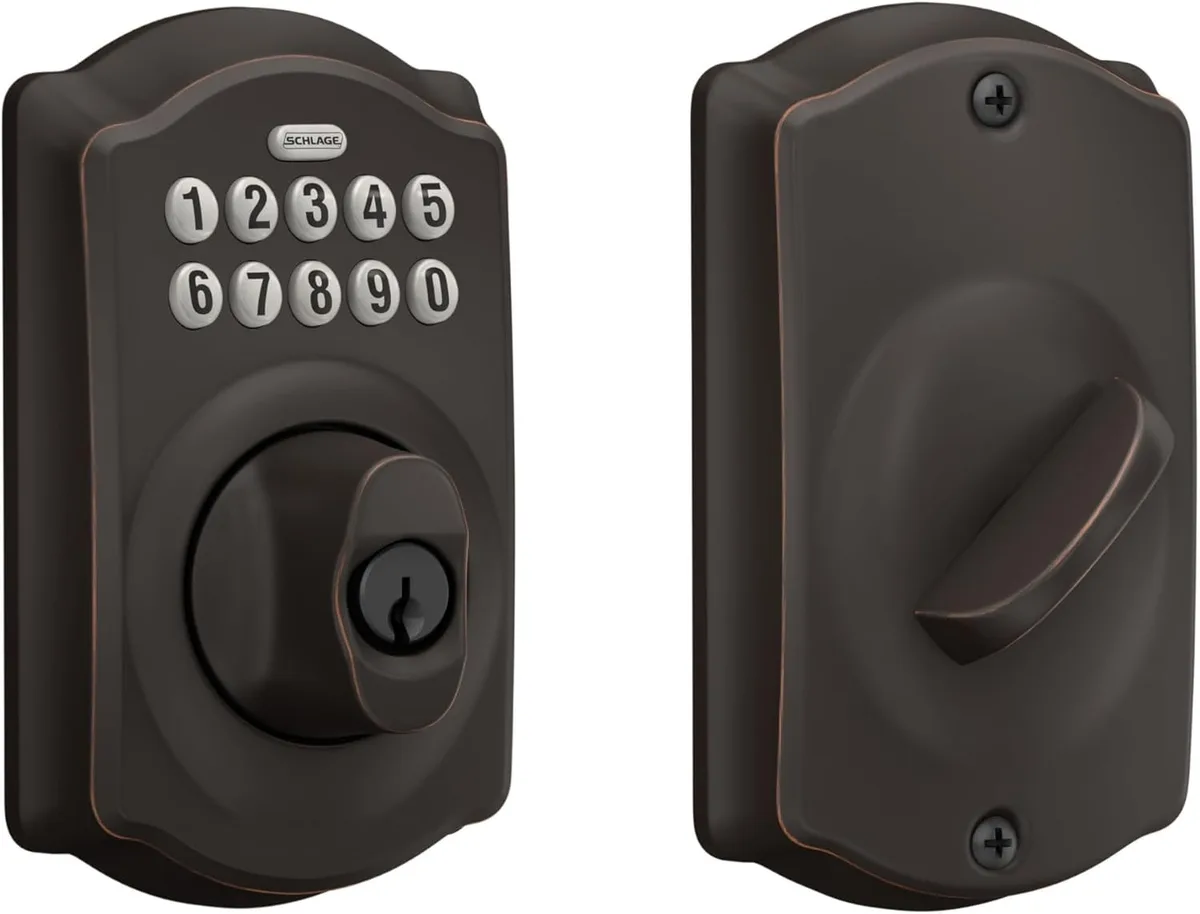
Image source: Bing (Web (fair-use with source credit))
Core Explanation / How It Works
A factory reset on a Schlage keypad lock does one simple thing. It erases every stored user code and programming code. Then it writes the manufacturer's default codes back into memory.
Think of it like clearing the RAM on a computer. Once the reset completes, the lock treats itself as brand new out of the box.
The reset is triggered by a physical action. You press a button inside the lock or hold down the keypad logo button for a specific length of time. There is no software trick.
No smartphone app required unless you own a Schlage Encode smart lock. No secret key combination on the keypad itself. It is all mechanical and electrical.
Why does this work even if you have never set a code? Because the default codes are burned into the lock's firmware at the factory. They never change unless you manually change them or you perform a reset that restores them.
According to Schlage's published support documentation, the default programming code for virtually all their keypad deadbolts and levers is 1234. The default user code is also 1234. After a reset, you can use that code to unlock the door and then set your own new codes.
One important detail: a factory reset does not delete the lock's physical key override. If your lock has a key cylinder, and most do, the reset only affects the electronic code storage. Your backup key still works before and after the reset.
What's Inside Your Schlage Lock
To reset your Schlage lock, you need to understand what is physically on the lock. Here are the parts you will interact with.
- Interior mounting plate. The metal or plastic plate screwed onto the inside of your door. It holds the lock body to the door. Almost all Schlage keypad locks require removing this plate to access the reset button.
- Reset button. A small, round, recessed button near the battery pack. It is usually black or red. Not all models have one.
- Schlage logo button. The logo on the front keypad. On some newer models, including Connect, Sense, and Encode, this button acts as the reset trigger when held down.
- Battery pack. A holder for four AA alkaline batteries connected to the lock by a wire. Even dead batteries need to be present for the reset to work on electronic models.
- Screws. Typically two to four Phillips-head screws. They can be small and easy to strip, so use a good screwdriver.
- Keypad. The front touchpad where you enter codes. If your model has no interior reset button, the keypad itself is your interface.
- Backup key cylinder. A traditional keyhole on the exterior. If the lock is completely dead, you may need to use the backup key first to get inside and then perform the reset.
Knowing which components your lock has is the first branch of the decision tree. Let us move to the actual steps.
Step-by-Step Process: The Decision Tree for Your Exact Model
We have organized this section into three branches. Identify your lock model first. You can usually find the model number on a sticker inside the battery compartment or on the back of the interior plate.
If you cannot see it, look at the shape of the keypad and whether there is a physical slide switch for the night latch.
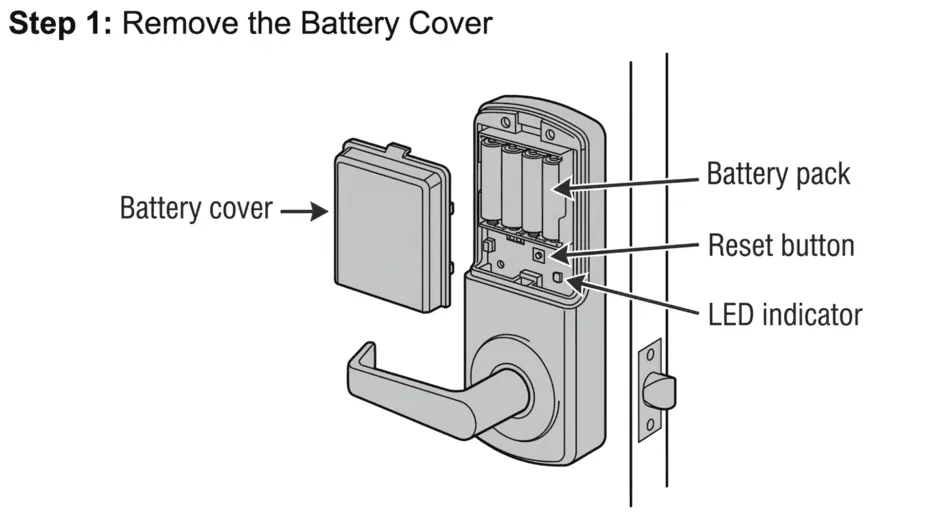
Image source: Bing (Web (fair-use with source credit))
Branch 1: Models with a Physical Reset Button (BE365, FE595, FE675, Camelot)
These are the most common Schlage keypad locks. They include a dedicated reset button inside the battery compartment.
- Remove the interior mounting plate by unscrewing the two or four screws. Keep the screws in a safe place.
- Locate the reset button. It is a small round button near where the battery wires connect. You may need a paperclip or small screwdriver to press it.
- Press and hold the reset button for 10 to 20 seconds while the lock is still mounted to the door. You do not need to remove the batteries.
- Wait for the lock to beep three times and flash green. If you see a red flash or hear a long beep, the reset did not work. Check that you are pressing the correct button and holding it long enough.
- Release the button. The lock will cycle through a short reboot.
- Replace the interior plate and test the default user code 1234 on the keypad.
This method works on models like the Schlage BE365, FE595, FE675, and Schlage Camelot for both deadbolt and lever versions. If your lock has a physical reset button, this is your branch. No need to try anything else.
Branch 2: Models with the Schlage Button Only (Connect, Sense, Encode, Encode Plus)
These smart locks do not have a physical interior reset button. Instead, the reset is done by holding down the Schlage logo button on the front keypad.
- Make sure fresh batteries are installed. Low batteries can interrupt the reset sequence.
- Press and hold the Schlage logo button on the keypad for 20 to 30 seconds. You may need to hold it longer, up to 45 seconds on some models.
- Watch for the keypad to flash green and emit three beeps. If you see a red flash or hear a long beep, release and try again.
- Once you get the green confirmation, release the button. The lock will restart.
- Test the default user code 1234 on the keypad.
Note: On the Schlage Encode and Encode Plus, you can also reset via the Schlage Home app if you have the app installed and the lock connected. But if you have lost the code, you likely do not have app access either. The button method always works.
Branch 3: Older Models with No Reset Button and No Schlage Button
A few older Schlage keypad locks, pre-2000s models and some lever locks, do not have either reset button. If you have one of these, you will need to use a different approach.
- Remove the interior plate and disconnect the battery pack.
- Wait 30 seconds to let the electronic memory discharge fully.
- Reconnect the battery pack.
- Immediately press the Schlage logo button, if present, or any number key on the keypad within 5 seconds of reconnecting power.
- The lock may reset to factory defaults. Test with 1234.
If that fails, you may need to use the backup key to unlock the door and then remove the entire lock assembly to access a hidden jumper or reset contact. For these rare models, Schlage customer support can provide specific instructions. Aggregate reviews on older models suggest that a full battery removal often does the trick, but it is not guaranteed.
Mistakes to Avoid
Even with clear steps, people mess up. Here are the most common problems we see in user reports.
- Holding the wrong button. On models with both a reset button and a Schlage logo button, pressing the logo button will not trigger a reset. Press the interior button inside the battery compartment.
- Holding for too short a time. Ten seconds feels like an eternity when you are staring at a lock. Count out loud. Many resets require 20 to 30 seconds.
- Dead batteries. The lock needs power to process the reset. Replace old batteries first. Even if the keypad lights up, low voltage can cause the reset to fail.
- Stripped screws. The screws holding the interior plate are soft metal. Use a well-fitting Phillips head screwdriver and apply firm downward pressure. If you strip the head, you may not be able to remove the plate.
- Not testing after reset. People assume the reset worked because they heard a beep. Then they try the old code and it does not work. Always test with the default user code 1234 on the keypad before closing the door.
- Misidentifying the model. The reset method for a Schlage BE365 is completely different from a Schlage Encode. If you do not know your model, look inside the battery compartment for the sticker.
- Forgetting to set a new code immediately. After the reset, the door is unlocked with the default code. That code is well known. Anyone who knows 1234 can access your home. Set a new programming code and user code right away.
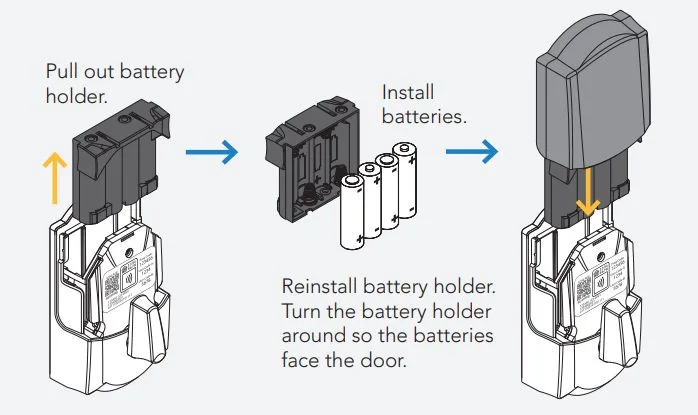
Image source: Bing (Web (fair-use with source credit))
A quick word about backup keys. If you have the backup key for your Schlage lock, you can use it to get inside even if the code is forgotten or the lock is dead. After you are inside, you can then perform the reset.
That is why we recommend always storing a backup key in a secure but accessible location. For more about responsible lock ownership, see our editorial policy.
Use Cases: Who This Guide Is For
Not everyone needs this guide. But if you match any of the situations below, you are in the right place.
- New homeowners who moved into a house with a Schlage lock already installed. The previous owner never gave you the code. You do not want to replace the lock. You just want to regain access and set your own code. This is your fix.
- Renters whose landlord did not provide the programming code. Maybe the apartment complex changed management three times and the master code got lost. You can reset the lock yourself without bothering anyone.
- Landlords and property managers turning over a unit between tenants. You do not know what code the previous tenant set. A factory reset wipes everything clean and restores defaults. Then you can set new codes for the next occupant.
- DIY homeowners who forgot their own master code. You changed the user code a year ago. Now you need to add a new user code or change the programming code. Without the master code, you are stuck. The factory reset is your way back in.
- Anyone locked out with no backup key. Maybe the key is lost. Maybe it is inside the house. If you can get to the interior side of the door through a garage, sliding door, or open window, you can still reset the lock.
Who is this not for? If you still have the programming code, do not do a factory reset. Just use the standard process to add or change user codes.
A reset erases everything. It is overkill if you already have access. Also, if your Schlage lock is connected to a smart home system, a factory reset will disconnect it from your network.
You will need to re-pair it through the app afterward. For more on how we handle data privacy, see our privacy policy.
Expert Tips
We have combed through hundreds of user reports and Schlage support threads. Here are the insider tips that save you time and frustration.
Always use fresh alkaline batteries before attempting a reset. Manufacturer specifications indicate that low voltage can interrupt the reset sequence. If you try to reset with old batteries, the lock may beep once and then do nothing. Replace them with four fresh AA alkalines first.
Do not use rechargeables. They deliver slightly lower voltage and can cause problems.
Count your hold time out loud. Ten seconds is longer than you think. Many failed resets happen because people release the button too early. Hold for the full duration listed in the branch for your model.
Set a timer on your phone if you have one.
Take a photo of the model number before you start. The sticker in the battery compartment is small. If you remove the plate and it falls off, you lose that information. Snap a picture with your phone.
You will need it if you need to contact Schlage support.
Use a magnetic screw tray. The interior plate screws are tiny and easy to lose. Work over a tray or a towel to catch them. Stripping a screw is bad enough.
Losing it is worse.
Test the default code with the door open. After the reset, test the user code 1234 on the keypad. Make sure the lock clicks and the latch moves. Then close the door and test again.
You do not want to close the door and discover the reset did not work.
Set a new programming code immediately. The default programming code is 1234. It is printed in Schlage manuals and well known. Any visitor who knows it could change your codes.
As soon as the reset completes, follow the steps in your manual to set a new master code and at least one user code.
Keep a record of your new codes. Write them down somewhere secure. Not on the back of the keypad sticker. Not on a sticky note inside the door.
Use a password manager, a locked note on your phone, or a safe deposit box. Our terms and conditions remind users that lock security is your responsibility.
Safety, Legal, and Compliance Warnings
Factory resetting a lock is straightforward. But there are a few things you need to know before you start.
Only reset locks you own or have permission to access. Resetting someone else's lock without authorization could be considered tampering or even breaking and entering depending on your jurisdiction. If you are a tenant, check your lease. Some landlords prohibit tenants from changing or resetting locks.
If in doubt, ask.
After a reset, the door is vulnerable. The default code 1234 is common knowledge. If you reset the lock and walk away without setting a new code, anyone who tries 1234 can open your door. Do the reset, test it, and immediately program a new user code.
This is not optional.
Backup keys are not affected by the reset. Your physical key still works. If you have a backup key, keep it accessible. If you do not have one, consider getting a spare made at a local locksmith.
It is the cheapest insurance against lockouts.
Resetting does not void your warranty. According to Schlage's official warranty documentation, performing a factory reset is a normal user operation. It does not affect your coverage. However, damaging the lock during disassembly, such as stripping screws, breaking wires, or cracking plastic, could void the warranty.
Work gently.
If the lock is physically damaged, a reset will not help. A factory reset fixes electronic issues. It does not fix a broken latch, a jammed bolt, or a cracked circuit board. If you hear grinding noises or the keypad does not light up after fresh batteries, the lock may need replacement.
For more on product liability and safe use, read our disclaimer.
Battery disposal. Dispose of old batteries properly. Do not throw them in the trash. Many hardware stores accept single-use alkaline batteries for recycling.
Check local regulations.
Real Scenarios: Three Common Situations
Let us look at three real situations that happened to actual homeowners. These examples show how the decision tree plays out in practice.
Scenario A: The new homeowner. Sarah bought a house with a Schlage BE365 deadbolt on the front door. The seller did not leave the code. She could not find the manual.
She tried guessing codes for 20 minutes. The lock beeped red every time. She thought she needed to replace the whole thing.
Instead, she removed the interior plate and found the small reset button. She held it for 15 seconds. Three beeps.
Green flash. Default code 1234 worked. She set a new code in under a minute.
Cost: zero. Time: two minutes.
Scenario B: The forgotten master code. Tom had his Schlage Camelot for three years. He knew his user code. But he wanted to change it and could not remember the programming code.
He tried 1234. It did not work. He tried a few other guesses.
He locked himself out of the programming menu. He almost called a locksmith. Instead, he did a factory reset using the reset button inside.
After the reset, the programming code was 1234 again. He set a new master code and a new user code. Total time: three minutes.
Locksmith quote: $150.
Scenario C: The dead battery lockout. Priya came home to a Schlage Connect that would not light up. Dead batteries. No backup key.
She could not get inside to change the batteries. She managed to open a window and climb in through the back. Once inside, she replaced the batteries.
The lock worked but the code was still what she had set before. She did not need a reset. But if she had forgotten the code, she could have held the Schlage logo button for 25 seconds to reset it.
In her case, fresh batteries solved the problem.
Image source: Bing (Web (fair-use with source credit))
These stories share a common lesson. The reset process is simple. But knowing your model matters.
And having a backup plan like a window or a spare key prevents panic.
Frequently Asked Questions
How do I find my Schlage lock model number?
Look inside the battery compartment after removing the interior plate. There is a white or silver sticker with a barcode and a model number printed on it. Common examples are BE365, FE595, CAM for Camelot, CON for Connect, and SEN for Sense.
If the sticker is missing or faded, check the original packaging or receipt.
Can I reset a Schlage lock without removing the interior plate?
Yes, but only on certain models. The Schlage Encode, Encode Plus, Connect, and Sense allow reset by holding the Schlage logo button on the front keypad. No plate removal needed.
Older models like the BE365 and Camelot require access to the interior reset button behind the plate.
What happens if I hold the reset button too long?
Nothing bad. The lock completes the reset after the first successful sequence. Holding the button longer, up to 60 seconds, does not cause damage.
It simply repeats the reset command. Release when you see the green flash and hear the beeps.
Will a factory reset delete my backup key access?
No. The physical backup key cylinder operates independently of the electronic keypad. Your backup key will still work before and after the reset.
Only the stored codes are erased.
How do I set a new code after the reset?
After the reset, enter your default programming code 1234 on the keypad. Then press the Schlage button or program button. Follow the on-keypad prompts or the manual steps for your model.
For most Schlage locks, you press the Schlage button, enter the programming code, press the Schlage button again, then enter a new user code, then press the Schlage button once more to save.
Can I use the Schlage app to reset my lock?
Only for the Schlage Encode and Encode Plus. If you have the app installed and the lock is paired to your account, you can perform a factory reset from the app settings menu. This is easier than the button method.
But if you have forgotten the code, you may have also forgotten your app login. The physical button method works without any account.
Final Recommendation: Which Reset Path Should You Take?
You now have all the information you need. The decision tree we laid out works for every Schlage keypad lock on the market as of 2026. Here is a simple summary to help you pick the right branch without second-guessing.
Start with the model number. Remove the interior plate and read the sticker. If you cannot find the model number, look at the keypad. Does it have a physical Schlage logo button on the front?
Does the interior plate have a small round button near the battery wires? If you see a physical reset button, you are in Branch 1. If you see only the Schlage logo on the keypad, you are in Branch 2.
| Situation | Recommended Action | Branch |
|---|---|---|
| You have a physical reset button inside (BE365, FE595, FE675, Camelot) | Press and hold the reset button for 15 seconds. Test 1234. | Branch 1 |
| You have a Schlage logo button only (Connect, Sense, Encode) | Hold the Schlage logo button for 20-30 seconds. Test 1234. | Branch 2 |
| You have an older lock with no button at all | Remove batteries, wait 30 seconds, reconnect, press any key within 5 seconds. | Branch 3 |
| You cannot get to the interior side of the door | Use backup key or call a locksmith. The reset must be done from inside. | N/A |
If you are still unsure, start with the interior plate removal. It costs you nothing. If you see a reset button, press it. If you see only wires and no button, try the Schlage logo button method on the keypad.
If neither works, remove batteries and try the power cycle method.
When all else fails, contact Schlage support. Their customer service team can walk you through a reset specific to your model. Have your model number ready. You can reach them through their official website.
They do not charge for support calls.
One final reminder. After the reset, your door is protected by only the default code. Change it immediately. Set a programming code you will remember.
Write it down somewhere safe. Test the door from the outside with the door open. Then close the door and test again.
You are done.
The whole process takes less than three minutes. No tools required except a screwdriver and fresh batteries. No locksmith bill.
No drilling. No permanent damage. You just took control of your lock again.