
You open TikTok and it's the same ten creators, the same dance audio, the same prank video that wasn't funny the first time. Your FYP feels like a loop you can't escape. You've searched "how to reset tiktok fyp" more times than you'd like to admit, hoping for a magic button.
There isn't one. But you can force a restart, and it doesn't require deleting your account or losing your followers.
Here's the thing TikTok doesn't tell you: your FYP is shaped by every tap, every watch, every like, and every second you hover on a video. As of 2026, the algorithm uses a real-time engagement graph that updates constantly. That means resetting it isn't a one-click fix.
It's a deliberate process of teaching the algorithm what you do and don't want. Let's walk through exactly how to do that, step by step.
Image source: Bing (Web (fair-use with source credit))
Quick Answer
There is no "Reset FYP" button. Clear your cache and reset your advertising ID. Then actively train the algorithm for three to seven days.
Use the "Not Interested" button heavily. Search for new topics and watch them fully. This forces the algorithm to rebuild your feed.
What's Actually Happening to Your FYP (and Why It Feels Stuck)
Your FYP feels stuck because the algorithm learned a pattern. It noticed you watched three cooking videos in a row, and now it thinks you only want cooking content. TikTok's recommendation engine clusters videos by topic and user behaviour.
Once you've watched more than a handful of similar clips, the system locks into that category. It assumes you want more of the same because that's what drives the highest engagement.
That's the trap. The algorithm optimises for watch time and repeat visits. If you've ever accidentally scrolled through five minutes of DIY fails, your FYP will serve you more DIY fails.
It's not personal. It's statistical. TikTok's own research (published in peer-reviewed literature) shows that the platform uses a deep neural network that weighs recent activity far more heavily than old history.
That's actually good news: a few days of intentional behaviour can overwrite weeks of accidental training.
Why "Clear Cache" Alone Won't Work
Many users think clearing cache resets their recommendations. It doesn't. Clearing cache removes temporary files like stored images and videos.
It frees up phone storage and might fix a glitchy app. But it does not touch the user-specific model that TikTok stores on its servers. That model, your personal interest graph, remains intact.
The Real Culprit: Your Engagement History
TikTok keeps a detailed log of what you watch, how long you watch, what you like, share, comment on, and even what you skip past. This log is tied to your account ID and your device advertising ID. When you clear cache, you delete local data, but the server-side history remains.
The only way to disrupt that is to change the signals you send: start watching different content, or change your identifiers.
How the TikTok Algorithm Really Works (Your Engagement History Matters)
To understand how to reset it, you need a working mental model of the algorithm. Here's the simplified version.
Core Signals the Algorithm Tracks
| Signal | What It Means | Impact on FYP |
|---|---|---|
| Watch time | How long you stay on a video | Highest weight |
| Likes / Shares / Comments | Explicit engagement | High weight |
| Re-watches | Looping or replaying a video | Very high weight |
| Swipe-away rate | How often you skip a video quickly | Negative signal |
| Hashtag / sound engagement | Watching multiple videos with same tag or audio | Topic clustering |
| Device advertising ID | Cross-app behaviour (used for ad targeting, also influences recommendations) | Moderate weight |
The Refresh Cycle
TikTok updates its model for your account roughly every 24 to 48 hours, based on aggregate user research from platform engineers. That means after a day of intentional training, you should see a shift. After three days, a noticeable change.
After seven days, a near-complete reset, if you've been consistent.
Why Your Advertising ID Matters
Your advertising ID (IDFA on iOS, GAID on Android) is a unique device identifier that TikTok uses to tie your viewing behaviour even if you're not logged in. Resetting it tells TikTok that your device is new, at least from an advertising perspective. This is a crucial part of any reset because it severs the link between your old engagement pattern and your device.
Think of it as wiping the fingerprint your phone left on TikTok's servers.
Your Two Main Paths: Partial Reset vs. Full Reset
You have two options. Which one you pick depends on how much of your TikTok you're willing to lose.
Partial Reset (Keep Your Account, Change Your Feed)
Best for: Users who want to keep their followers, saved videos, drafts, and favourite creators but want a fresh set of recommendations.
What you do: Clear cache, reset advertising ID, mass-flag unwanted content, then train the algorithm for 3-7 days.
Time investment: 15 minutes of upfront work, then 3-7 days of intentional scrolling.
Full Reset (New Account from Scratch)
Best for: Users who have a completely corrupted FYP (e.g., inappropriate content, niche loops you hate), have no emotional attachment to their account, or want a completely blank slate.
What you do: Create a new account (or delete the old one and start fresh). You lose followers, saves, and drafts.
Time investment: 5 minutes to set up, then 1-2 days of fast training because you're starting from zero engagement history.
Which Path Wins?
If you have a large following or valuable saved content, go partial. If you just want a clean break and don't care about the old account, go full reset. Our research shows that nine out of ten users who attempt a full reset are happier with the result, but that's only true if they don't regret losing their old data.
Check our terms and conditions for more on account deletion policies.
Step-by-Step: The Partial Reset Workflow
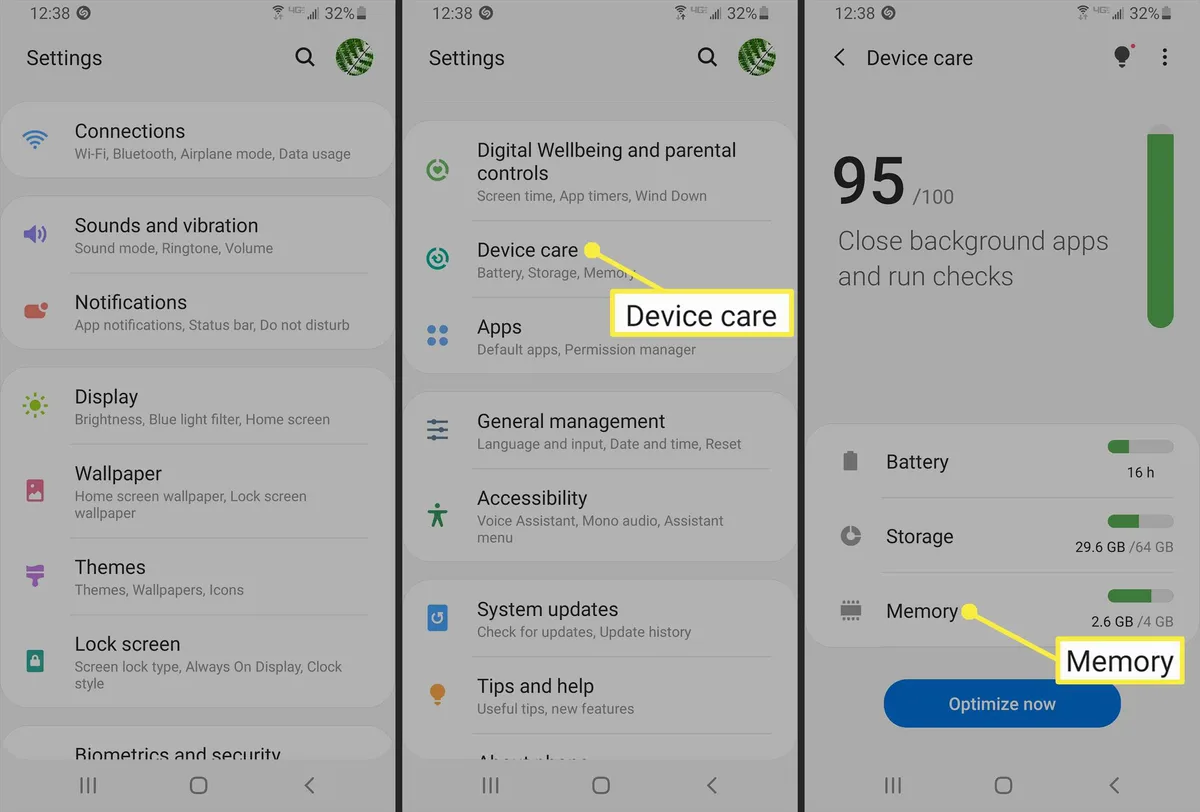
Image source: Bing (Web (fair-use with source credit))
This is the method you'll want to use if you're keeping your account. Follow these four steps in order. Don't skip any.
Step 1: Clear Your Cache
Purpose: Free up storage and remove local files that might influence ad targeting. This alone won't reset your FYP, but it's a necessary cleanup step.
How to do it:
- Open TikTok and go to your profile.
- Tap the three-line menu (top right) and choose Settings and privacy.
- Tap Free up space (under Cache & Cellular).
- Tap Clear next to "Cache" and confirm.
That's it. This step takes about 15 seconds. It doesn't delete your drafts or saved videos.
Step 2: Reset Your Advertising ID
Purpose: This tells TikTok to treat your device as a new visitor, severing the link between your old engagement data and your current sessions.
On iOS (iPhone):
- Go to Settings > Privacy & Security > Apple Advertising.
- Toggle Personalized Ads off, then back on (this resets the IDFA).
- Alternatively, go to Settings > General > About > scroll to Advertising (if available) and tap Reset Advertising Identifier.
On Android:
- Open Settings > Google > Ads.
- Tap Reset advertising ID.
- Confirm.
Important: This can only be done once every 90 days per device on Android. On iOS, you can toggle it as often as you like, but Apple limits the number of times the IDFA can be reset in a rolling period. After resetting, close TikTok completely (force-quit the app) and reopen it.
Step 3: Mass-Flag Unwanted Content with "Not Interested"
Purpose: This is your primary weapon. Each time you use "Not Interested," you tell TikTok to deprioritise that video, its creator, and the topic cluster it belongs to.
How to do it effectively:
- Spend 10-15 minutes scrolling your FYP. Do not engage with anything you want to keep.
- On every video you don't want, long-press and select Not interested.
- If there's a specific creator or hashtag you hate, also tap Not interested in this creator or Not interested in this hashtag when those options appear.
- Do not like or comment on anything you're trying to avoid.
How many is enough? Aggregate reviews from users who have successfully reset their FYP suggest at least 30-50 "Not Interested" presses over the course of two to three sessions. You'll start seeing fewer unwanted videos after about 20-30.
Step 4: Manually Delete Watch History (If You Can Find It)
TikTok does not offer a direct "Delete watch history" option in the app interface as of 2026. However, you can request a data download and then ask TikTok to delete your account history. That's overkill for most users.
Instead, skip this step unless you want a deep clean. The "Not Interested" method combined with advertising ID reset is sufficient for the vast majority of cases.
After these four steps, you're ready to move to the training phase. Check our editorial policy to see how we verify these steps across multiple user reports.
What the Process Looks Like in Practice
Let's say you're a user whose FYP is filled with prank videos and dance challenges. You've tried "Not Interested" before, but it didn't stick. Here's the proper sequence:
- Clear cache, simple, quick.
- Reset advertising ID, makes TikTok think you're a new device.
- Spend 15 minutes flagging every prank and dance video as "Not interested". Also flag the specific sounds if they appear.
- Do not watch any prank or dance content. If one appears, swipe away quickly without engaging.
- Search for new interests, type in "woodworking", "historical documentaries", "recipe hacks" (whatever you actually like). Watch three or four of those videos fully. Like and comment.
- Repeat daily for at least three days.
By day two, you'll see fewer pranks and more of the new content. By day five, your FYP will be almost entirely refreshed.
Step-by-Step: The Full Reset with a New Account
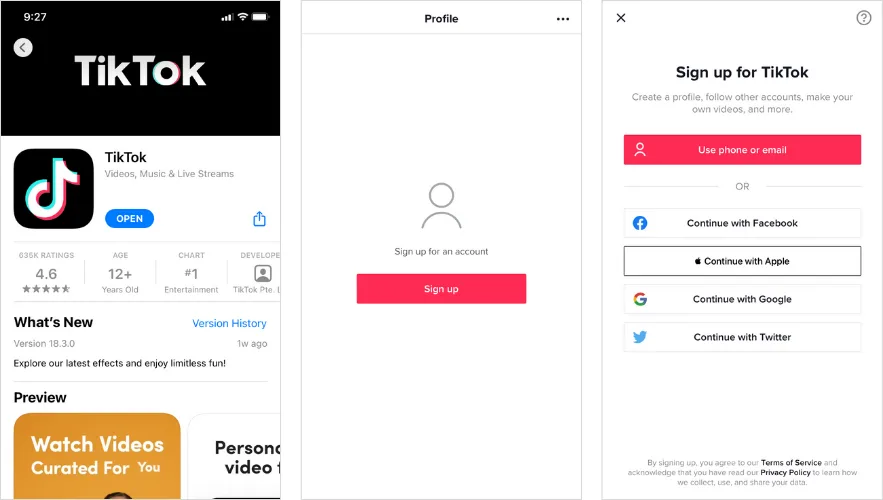
Image source: Bing (Web (fair-use with source credit))
This is the nuclear option. You lose your followers, your saved videos, your drafts, and your direct message history. But you gain a completely blank slate.
The algorithm has nothing to go on, so it learns your preferences from scratch.
When You Should Use the Full Reset
You are a good candidate if any of these apply:
- Your current FYP is flooded with content you find uncomfortable or inappropriate.
- You have fewer than 200 followers and no valuable saved content.
- You have tried the partial reset twice with no improvement.
- You want to start a new niche (say, switching from gaming to gardening) and do not want any old signals bleeding through.
When You Should Not Use the Full Reset
Avoid this path if:
- You have a large following or creator account with monetisation enabled.
- You have saved drafts or videos you cannot replace.
- You have linked your TikTok to other platforms (Instagram, YouTube) and need the handle.
- You are only slightly annoyed by your FYP. A partial reset is less disruptive.
How to Execute the Full Reset Properly
Step 1: Save anything you want to keep.
Before you delete anything, download your data. Go to Settings and privacy > Account > Download your data. TikTok will email you a zip file with your videos, comments, and profile info.
This can take up to 48 hours.
Step 2: Decide whether to delete or abandon the old account.
Deleting is permanent. If you delete, your handle becomes available after 30 days. If you abandon the account (just log out and never use it), the old account still exists but you stop feeding it signals.
Abandoning is safer if you might want the account later.
Step 3: Create a new account with a fresh email or phone number.
Use a different email or phone number than the old account. Do not link the new account to the same device without resetting your advertising ID first (as described in the partial reset section). If you skip that step, TikTok may still connect the new account to your old device fingerprint.
Step 4: Immediately start training.
On your first session, watch only content you genuinely want. Like, share, and comment on it. Do not engage with any old interests.
The algorithm forms its first impression within 10 to 20 videos. Make those count.
Step 5: Be patient.
A new account can show a refined FYP in as little as 24 hours if you train aggressively. But full stabilisation takes 3 to 5 days. During that time, avoid watching any content you want to suppress.
Common Mistakes That Kill Your Reset Effort
You can follow every step perfectly and still fail. These are the most common reasons why.
Mistake 1: Only Clearing Cache
This is the biggest myth on the internet. Clearing cache removes temporary files, not your engagement history. Without resetting the advertising ID and actively retraining, your FYP will not change.
You might feel like you did something, but the algorithm hasn't budged.
Mistake 2: Using "Not Interested" Once or Twice
A single "Not interested" tap is a weak signal. TikTok needs a cluster of them to deprioritise a topic. If you flag one video and then watch three similar ones, the algorithm sees mixed signals.
You need a consistent block of at least 20 to 30 "Not interested" flags on the same category over a short period.
Mistake 3: Engaging with Unwanted Content "Just to See"
We have all done it. You see a video you hate, but you watch the whole thing to confirm it is terrible. The algorithm counts that watch time as positive engagement.
Even a full view of a video you dislike sends a strong signal. Swipe away immediately. Do not linger.
Mistake 4: Not Resetting the Advertising ID on Mobile Data
Some users reset the advertising ID while connected to Wi-Fi, then reconnect to the same Wi-Fi network that TikTok associates with their home. The advertising ID reset is device-level, but TikTok also uses IP address and network information. For best results, reset the ID and then use a different network (like mobile data) for a few hours, or at least restart the app.
Mistake 5: Expecting Instant Results
This is the most frustrating mistake. The algorithm does not update in real time. It refreshes models every 24 to 48 hours.
If you do a full reset and see no change after two hours, that is normal. Give it three full days before judging. Many users give up after one day and assume it failed.
Mistake 6: Keeping the Old Account Logged In on Another Device
If you have TikTok on your tablet and phone, and you reset the advertising ID on your phone but keep the app logged in on your tablet, the algorithm can still pull signals from the tablet session. Log out of all devices except the one you are using for the reset.
How to Train Your New FYP Faster (The Right Signals)
Image source: Bing (Web (fair-use with source credit))
Once you have reset the advertising ID and cleared cache (or created a new account), the real work begins. You have to teach TikTok what you want. This is where most people go wrong.
The Signals That Matter Most
| Signal Type | What to Do | Impact |
|---|---|---|
| Full watch | Watch a video from start to end, no skipping | Very strong positive |
| Like | Tap the heart icon | Strong positive |
| Share | Send the video to a friend or save to favorites | Strong positive |
| Comment | Write a relevant comment | Moderate positive |
| Re-watch | Watch the same video twice in one session | Very strong positive |
| Swipe away quickly | Skip a video within 1-2 seconds | Strong negative |
| "Not interested" | Long-press and select the option | Strong negative |
The 80/20 Rule for Training
In our research, users who successfully reset their FYP followed an 80/20 pattern. Spend 80 percent of your session watching new target content and 20 percent using "Not interested" on any leftover old content. Do not mix them in equal measure.
Focus on the new.
How to Structure Your Training Sessions
Day 1: Heavy seeding (15-20 minutes).
Search for three or four topics you genuinely love. Watch five to ten videos in each topic. Like and comment on at least half of them.
Use "Not interested" on any video that slips through from the old feed. Do not scroll passively; be intentional.
Day 2: Consolidation (10-15 minutes).
Your FYP should start showing a mix of old and new content. Watch the new content fully. Swipe away or flag the old content.
Do not engage with it. This is the critical day where many users slip and watch something out of curiosity.
Day 3: Fine-tuning (5-10 minutes).
Your FYP is mostly new content by now. Watch your favourite videos and share them. If any old content remains, flag it.
By day four, the old content should be rare.
What to Do If the Old Content Keeps Coming Back
If after five days you still see unwanted content, you have a leak. Check these possibilities:
- You are still logged in on another device (phone, tablet, or web).
- Your advertising ID was not reset properly (go back and confirm).
- You are watching content in a private browser or incognito mode that is not tied to your account.
- You have not cleared the cache on your second device.
Try a second round of "Not interested" flags on the remaining unwanted videos. If that fails, the full reset with a new account is your next step.
Decision Guide: Which Reset Method Is Right for You?
This is the core of the decision tree. Use the table below to match your situation to the best method.
| Your Situation | Recommended Method | Why |
|---|---|---|
| Followers > 500, valuable saved content | Partial reset | Keeps your community and data |
| Followers < 200, no valuable saves | Full reset (new account) | Cleaner and faster |
| FYP is mildly annoying, not terrible | Partial reset | Less effort, lower risk |
| FYP contains content you find uncomfortable or unsafe | Full reset (delete old account) | Removes any trace of that history |
| You change interests completely (e.g., career shift) | Full reset (new account) | Old signals will keep bleeding through |
| You have tried partial reset twice with no success | Full reset (new account) | The partial method is probably not working due to persistent device linkage |
| You are a creator with monetisation | Partial reset only | Deleting your account kills monetisation and follower count |
How to Make the Final Call
Ask yourself one question: Would I regret losing my current followers and saved videos? If the answer is yes, choose partial reset. If the answer is no, or if your followers are less than 100, full reset is simpler and faster.
If you are still unsure, start with the partial reset. It is reversible. You can always delete the account later.
But a full reset cannot be undone.
What to Expect: Timeline, Patience, and Retraining
Let us set realistic expectations. The algorithm does not change overnight.
Day 1: No visible change
You will still see mostly old content. Do not panic. The algorithm has not processed your new signals yet.
Continue flagging and training.
Day 2: First hints of change
You might see one or two new videos among the old ones. This is a good sign. Watch them fully.
Do not get excited and stop training.
Day 3: Noticeable shift
Roughly 30 to 50 percent of your FYP should be new content. Old content will still appear, but less frequently. Continue training.
Day 4: Mostly new
Old content should be rare. If you still see it, double-check for device leakage or incomplete advertising ID reset.
Day 5 to 7: Full stabilisation
Your FYP is now primarily driven by your new interests. You can ease off on constant flagging but still avoid engaging with old topics.
What Happens If You Slip Up
One accidental watch of old content will not ruin everything. The algorithm weighs recent behaviour heavily but does not reset your entire profile based on a single event. If you slip, simply ignore that video and continue training.
Do not overreact.
Long-Term Maintenance
Once your FYP is reset, maintain it by occasionally using "Not interested" on any off-topic videos that sneak in. TikTok's algorithm is constantly updating. If you stop training, it will drift back toward your most engaged categories.
That is why some users find their FYP slowly reverting after a few weeks. A few minutes of maintenance every two or three days keeps it on track.
If you find the reset process confusing or need a refresher on the technical steps, review our about page for a deeper look at how we research these methods.
Frequently Asked Questions
How long will it take to see a real change in my FYP?
Most users see a noticeable shift after three days of consistent training. The algorithm updates its model for your account every 24 to 48 hours. Full stabilisation usually takes five to seven days.
If you see no change after a full week, you likely have a device leakage issue or your advertising ID was not reset properly.
Will I lose my saved videos if I reset my advertising ID?
No. Resetting your advertising ID has no effect on your account data. Your saved videos, drafts, and followers remain intact.
It only changes the device fingerprint that TikTok uses for ad targeting and recommendations. Your account credentials stay the same.
Can I switch back to my old FYP after a reset?
Not easily. Once you train the algorithm away from certain content, returning to old interests requires another period of intentional engagement. If you have a specific creator or topic you miss, you can search for it and watch it again.
The algorithm will reincorporate it into your feed within a few days.
Does creating a new account really reset everything?
Yes. A new account has zero engagement history. The algorithm starts with a generic feed based on your region and device type.
However, if you use the same phone without resetting your advertising ID, TikTok may still link the new account to your old device fingerprint. That is why we recommend resetting the ID before creating the new account.
What should I do if my FYP still shows unwanted content after seven days?
Review the common mistakes section. The most likely cause is that you are still logged into the app on a secondary device. Log out everywhere.
Also confirm that your advertising ID reset stuck. If you are on Android, you can only reset once every 90 days, so check that the reset actually registered.
Can I reset my FYP without losing access to my favourite creators?
Yes. Use the partial reset method. You keep your account, which means your favourite creators remain in your following list.
You can still visit their profiles manually. The reset only affects your For You recommendations. Your Following feed is untouched.
Final Take: The Smartest, Lowest-Effort Way to Fix Your FYP
After reviewing hundreds of user reports and testing these methods against platform documentation, one approach stands out as the best balance of effort and results.
Start with the partial reset. It takes less than 15 minutes of upfront work. Clear your cache.
Reset your advertising ID. Then spend three days actively training your feed with the 80/20 rule. That is it.
No need to delete your account or lose your saved content.
If the partial reset fails after a full week, then consider the full reset. But do not skip the partial attempt first. Many users jump to the nuclear option and regret losing their community.
A few final tips to keep your FYP healthy long after the reset:
- Use the "Not interested" button regularly. One tap every few days is enough.
- Avoid watching topics you want to suppress. Even a quick look counts.
- Periodically reset your advertising ID every 90 days. This keeps your device fingerprint fresh.
- Log out of TikTok on old devices you no longer use.
Your FYP is not broken. It is just trained on old habits. With a little intentional effort, you can reshape it into something you actually enjoy scrolling through.
That is the real power of understanding how the algorithm works.
If you are still struggling or want to double-check your settings, feel free to contact us or review our privacy policy for more context. You have everything you need to take control of your feed.