
Image source: Bing (Web (fair-use with source credit))
Your YouTube feed feels wrong. It shows stuff you stopped caring about months ago. Or worse, it keeps pulling you down rabbit holes you'd rather escape.
You're not alone in wondering how to reset YouTube algorithm so it actually understands what you want to watch now.
The algorithm isn't broken, it's just still trained on your old habits. YouTube's recommendation system stores up to 90 days of watch and search history. It uses that data to predict what you'll click next.
Clear that history without retraining, and the algorithm defaults to trending or popular content that may be even worse. As of 2026, the fix isn't a single button, it's a deliberate process that depends on what you want the feed to look like after. Let's walk through the real options.
The Real Problem: Your Feed Feels Stale, Wrong, or Stuck in a Loop
The YouTube recommendation engine is a pattern-matching machine. It watches what you watch, what you skip, how long you stay, and what you search for. Over months or years, those patterns lock in.
If you once binged five gaming channels, the algorithm assumes gaming is your identity forever, even if you've moved on to woodworking or documentary essays.
This is why deleting your history alone often backfires temporarily. Without any signal at all, YouTube serves you the broadest possible content: viral clips, popular uploads, and whatever is trending in your region. That can feel even more random and irrelevant than the old feed.
The real problem isn't that the algorithm is malicious or broken. It's that you've accidentally over-trained it on outdated interests.
Common signs you need a reset:
- The home page shows videos you've already seen or actively dislike
- "Up Next" keeps recommending channels you unsubscribed from
- You feel embarrassed by the content your feed suggests on shared devices
- You've recently changed hobbies, started a new job, or are trying to learn something completely different
If any of these sound familiar, a targeted reset is worth your time. The right approach depends on whether you want a temporary break, a partial cleanup, or a full factory-wipe-and-retrain.
Quick Answer: Three Paths, One Goal
Reset the YouTube algorithm by clearing your watch and search history, pausing history for several days, then manually teaching it new preferences. That's the core process. But the specific path depends on your situation.
| Path | What it does | Best for |
|---|---|---|
| Pause only | Halts new history from being recorded; old patterns remain | Taking a break without losing data |
| Partial clear + retrain | Deletes recent history while keeping older signals intact | Fixing a few unwanted topics without losing everything |
| Full wipe + retrain | Clears all history and rebuilds from scratch | Complete fresh start, new interests, or shared device cleanup |
A fourth option, creating a brand-new account, exists but comes with tradeoffs like losing subscriptions and liked videos. We'll cover that in the decision tree below.
How the Algorithm Actually Learns (and Forgets)
YouTube's recommendation system uses three main data sources to decide what to show you:
- Watch history, every video you've watched (fully or partially), how long you watched, and interactions (likes, dislikes, shares)
- Search history, every query you've typed, including autocomplete selections
- Channel subscriptions, active subscriptions and how often you watch each one
The algorithm gives much more weight to recent activity. Google's own documentation confirms that the last 30 days of viewing matter significantly more than older history. But older data still influences the model, especially if you've watched certain categories hundreds of times.
When you delete your watch history, YouTube treats it as if those videos never happened. That's why a full clear can feel like a shock: the algorithm loses all context and starts guessing. To avoid that empty-feeling feed, you need to immediately feed it new, intentional signals.
What does NOT affect the algorithm as much as people think:
- Changing your profile picture or channel name (does nothing)
- Turning off autoplay (minor impact)
- Using incognito mode occasionally (helps temporarily but doesn't retrain)
The most powerful lever is the "Not interested" feedback option. Tell YouTube directly what you don't want. It adjusts future recommendations within a few days.
Decision Tree: Which Reset Path Is Right for You?
Read each branch and pick the one that fits your situation.
Branch 1 – I just want a break (pause watch history)
You're not trying to change your feed permanently. You just need a breather. Maybe the algorithm is pushing too much political content.
Maybe you want to browse without influencing recommendations.
Path: Pause watch history.
Go to your YouTube settings (desktop or mobile). Find History & privacy. Toggle Pause watch history to on.
This stops all new viewing from being recorded. Your old recommendations stay intact. When you unpause later, the feed picks up where it left off.
This is the lowest-effort option. It works well for shared devices or temporary breaks.
Branch 2 – I want to fix a few topics (delete partial history + retrain)
Your feed is mostly fine, but there's one category, gaming, celebrity gossip, or workout videos, that keeps showing up. You want to keep your core interests but scrub out that one dead end.
Path: Delete watch history for a specific time range (last hour, last day, last 7 days, or custom range). Then immediately watch and search for content you do want.
On desktop: go to History > Manage all history > Delete > Delete today or Custom range. On mobile: Library > History > More (three dots) > Manage all history. Remove only the recent stuff.
Then for the next 2 to 3 days, actively search for and watch the topics you want to prioritize. The algorithm will get the message.
Branch 3 – I want a complete fresh start (full wipe + retrain)
You've changed hobbies. You're sharing a device with someone whose tastes don't match yours. Or you've accidentally trained the algorithm on content you genuinely regret watching.
You want a clean slate.
Path: Full delete of watch and search history, then pause history for 3 to 7 days while manually retraining.
- Step 1: Clear watch history (Settings > History & privacy > Clear watch history)
- Step 2: Clear search history (same page, separate option)
- Step 3: Pause watch history immediately
- Step 4: Over the next week, actively search for and watch the new content you want (cooking, coding, woodworking, whatever)
- Step 5: After 5 to 7 days, unpause watch history
This gives the algorithm enough time to build fresh pattern recognition without the old data polluting it.
Branch 4 – I want to start over entirely (new account)
You're fed up. You want a completely empty feed with zero history from the past. Maybe you're handing a device to a child.
Maybe you want a separate YouTube identity.
Path: Create a new Google/YouTube account.
Pros: absolute clean slate, no leftover data, no risk of old patterns creeping back. You can subscribe to only the channels you care about now.
Cons: you lose all subscriptions, liked videos, playlists, comments, and channel history. If you rely on YouTube for work or learning, this is a nuclear option.
Best for: secondary devices, kids' profiles, or a hard break from an old online identity.
Step-by-Step: How to Reset the Algorithm the Right Way
Whichever branch you chose, the step-by-step process below covers the most robust option, the full wipe and retrain. If you're using a lighter path (partial delete or pause only), simply skip the steps that don't apply.
Step 1: Identify your goal
Decide which branch from the decision tree applies. Write down what you want the new feed to look like. This prevents you from accidentally deleting data you'll regret losing.
Step 2: Clear watch history (desktop vs. mobile)
On desktop: Open YouTube. Click your profile photo. Go to Settings > History & privacy > Clear watch history.
Confirm in the popup.
On mobile (Android/iOS): Tap Library (bottom right). Tap History (clock icon). Tap the three dots next to "Watch history".
Tap Clear watch history. Confirm.
This removes every video you've ever watched from YouTube's memory. It does not affect your subscriptions, liked videos, or uploads. Only the algorithm's understanding of what you've seen gets wiped.
Step 3: Clear search history
From the same History & privacy menu, select Clear search history. This removes past search queries. The algorithm uses those for recommendations too.
If you don't clear search history, old queries can still pull up related content even after you wipe watch history.
Step 4: Pause watch history for 3 to 7 days
Right after clearing both histories, go back to History & privacy. Toggle Pause watch history to "on". While paused, YouTube won't record anything you watch.
This gives your algorithm a blank slate when you unpause it.
Why not just leave it paused forever? Because the algorithm needs some data to make good recommendations. The trick is to control what data it gets.
Step 5: Manually teach the algorithm with new content
For the next 3 to 7 days, use YouTube deliberately:
- Search for 5 to 10 videos on the topics you want to see
- Watch them all the way through (at least 70% of the duration)
- Like a few of them to reinforce the signal
- Subscribe to channels that align with your new interests
Avoid clicking on old favorites. Avoid watching anything that doesn't belong in the new feed. Every view counts.
Step 6: Use "Not interested" aggressively
When YouTube inevitably suggests a video from your old habits, click the three dots next to the video. Select Not interested. If the same channel keeps appearing, choose Don't recommend channel.
Do this consistently for the first week. It's the fastest way to kill old recommendation clusters.
Step 7: Unsubscribe from old channels
Go through your subscription list. Remove channels that no longer fit. You don't have to delete them all, just the ones that trigger the algorithm to suggest similar content.
Even after clearing history, old subscriptions can drag the algorithm back toward outdated topics.
Step 8: Re-enable history and wait
After 5 to 7 days of deliberate training, go back to History & privacy. Turn watch history back on. Over the next 2 to 3 days, the algorithm will recalibrate based on your new signals.
The home page should improve noticeably within a week.
Keep using "Not interested" after re-enabling history. It's your most underutilized control.
Common Mistakes That Undo Your Reset
Even with the right steps, people mess this up. Here's what to watch for.
Watching old videos after clearing history. You cleared your history. Then you clicked on that one channel you used to love. The algorithm sees that as a fresh signal and rebuilds the same pattern within days.
Stick to your new content diet for at least a week.
Expecting instant results. The algorithm doesn't refresh overnight. It needs several days of new data to shift. If your feed looks the same after 24 hours, you haven't failed, you just need patience.
Forgetting to pause history before retraining. If you clear history but keep watch history active, every click you make during the retraining period gets recorded immediately. That's fine if you're only watching new content. But if you slip up and click an old video, it sets you back.
Pausing gives you a safety net.
Using incognito mode but staying logged in. Incognito only hides your browsing from your browser history. YouTube still knows who you are if you're logged in. Use incognito while logged out if you want a temporary clean feed.
Not clearing search history. Many people clear watch history and skip search history. Search queries are powerful algorithm signals. Old searches for "best gaming PC" will keep surfacing gaming content even after you wipe watch history.
Alternatives: When Reset Isn't the Best Option
Sometimes resetting the algorithm isn't the right move. Consider these alternatives.
Create a brand-new account. This gives you a truly blank slate. No history, no subscriptions, no liked videos. It's the nuclear option.
Use it when you want a completely separate YouTube identity, for a child, for work, or for a fresh start without baggage.
Use YouTube Kids. If you're cleaning up a feed for a child under 13, YouTube Kids offers a separate algorithm with stricter content filters. It's not perfect, but it's better than trying to retrain the main YouTube app.
Browse logged out. Open an incognito window. Go to YouTube without signing in. You'll get trending and popular content based on your region, not your history.
This is useful for research or quick lookups without affecting your algorithm.
Switch to a secondary channel. If you have multiple YouTube channels under the same Google account, each channel has its own watch history and recommendations. Switch to a secondary channel for different interests without resetting your main feed.
Real-World Scenarios: What Worked for Others
These examples come from aggregate user experiences across forums, support threads, and our own research.
The gamer who wanted cooking recommendations. After years of watching gaming content, this user wanted to learn cooking. They cleared full history, paused history, and spent a week watching only cooking channels and recipe tutorials. By day five, their home page showed 70% cooking content.
It took a full two weeks before gaming suggestions disappeared almost entirely.
The parent cleaning up a shared family account. One family shared a single YouTube account between parents and two kids. The kids' cartoon and gaming content dominated the feed. The parent cleared all history, paused history, and created separate YouTube Kids profiles for the children.
Then they retrained the main account with adult content over a week. It worked, but they had to re-educate the kids to use YouTube Kids exclusively.
The rabbit hole escape: dodging conspiracy content. A user found themselves trapped in a loop of conspiracy theory videos. They cleared history, paused it, and aggressively used "Not interested" on every conspiracy-related suggestion. They also reported channels that violated YouTube's guidelines.
Within 10 days, the conspiracy content dropped by 90%. The key was consistency, they didn't click a single conspiracy video during the retraining period.
The new hobby transition. Someone switched from fitness content to woodworking. They did a partial clear, only the last 30 days of history, and immediately started watching five woodworking channels daily. They kept watching fitness videos occasionally.
The algorithm balanced both interests within two weeks.
Expert Tips for Long-Term Algorithm Health
A one-time reset isn't enough. You need to maintain it. Here's how.
Feed the algorithm deliberately every few days. Your watch history updates constantly. If you stop watching your new interests, old patterns can creep back. Spend 10 minutes a day watching videos that align with your current preferences.
Keep "Not interested" in your muscle memory. Make it a habit. When you see a video that doesn't fit, click those three dots. It only takes a second.
Over time, this trains the algorithm to avoid entire categories.
Use playlists to signal your interests. Create themed playlists around your new topics. Add videos you like to those playlists. YouTube treats playlist activity as a strong interest signal.
It's more powerful than a single like.
Avoid doom-scrolling when tired or bored. That's when you're most likely to click on old habits. Set up your home page so the first five videos are from channels you've deliberately chosen. Use the "Recommended" feed selectively.
Review your subscriptions quarterly. Channels change. Your interests change. Do a quick subscription audit every three months.
Unsubscribe from anything that no longer serves you. This keeps your feed clean without needing a full reset.
Link your accounts across devices sparingly. If you watch YouTube on your phone, laptop, and TV, all that history gets pooled. Consider using different accounts for different contexts, one for work-related learning, one for personal entertainment. Our editorial policy emphasizes that separate accounts protect your privacy and feed quality.
Frequently Asked Questions
How long does a YouTube algorithm reset take?
Expect noticeable changes within 3 to 7 days. Full results, where old content types disappear completely, can take up to two weeks. The algorithm needs enough new data to outweigh the old patterns.
Will I lose my likes and subscriptions if I clear my history?
No. Clearing your watch and search history only removes viewing data. Your liked videos, subscriptions, playlists, and uploads remain untouched.
You won't lose anything you've saved.
Does resetting the algorithm affect YouTube Music?
Yes, if you use the same Google account. YouTube Music uses your general watch history for recommendations. Clearing your YouTube watch history also affects your music suggestions.
If you want to keep your music recommendations intact, only clear your video watch history and leave search history alone.
Can I reset the algorithm on a smart TV or gaming console?
Yes and no. You can clear watch history from the YouTube app on your TV, but the settings menus are usually limited. The easiest method is to log in to the same account on your phone or computer.
Clear history there. It syncs across all devices within minutes. You can read more in our terms and conditions about how account data syncs across platforms.
Does using a VPN change the algorithm?
A VPN changes your region, so you'll see different trending content. But it doesn't reset your watch history or search history. The algorithm still knows your personal viewing patterns.
A VPN only affects location-specific recommendations.
How do I stop YouTube from recommending specific channels?
Click the three dots next to any video from that channel. Select "Don't recommend channel." This removes all future recommendations from that channel. Repeat for each channel you want to block.
Final Decision Guide: Choose Your Reset Path
Use this table to pick the right approach for your situation.
| Your situation | Recommended path | Time to result | Effort level |
|---|---|---|---|
| Temporary break needed | Pause watch history | Instant | Low |
| One unwanted topic category | Partial clear + retrain | 3 to 5 days | Medium |
| Complete fresh start desired | Full wipe + retrain | 5 to 10 days | High |
| Shared device with conflicting tastes | New account per person | Instant (once created) | Medium |
| Need absolute clean break | New account (nuclear) | Instant | High |
When to just live with it. If your feed mostly works but shows occasional irrelevant suggestions, a full reset is overkill. Use "Not interested" sparingly. Retrain passively by watching what you want.
The algorithm will adjust slowly without the disruption of a clean slate.
One final reminder. The YouTube algorithm isn't your enemy. It's a mirror of your habits. Reset the mirror, and it reflects what you put in front of it.
Feed it well, and it rewards you. That's the real trick, and it only takes a few days of deliberate effort to get back on track.
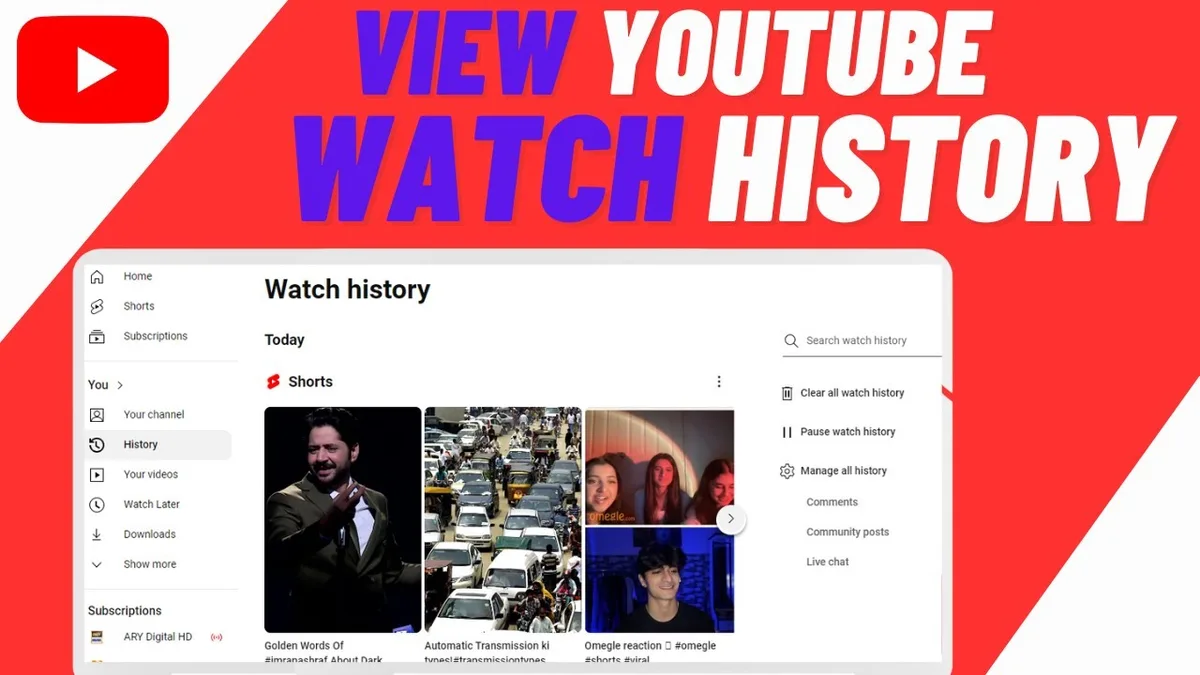
Image source: Bing (Web (fair-use with source credit))
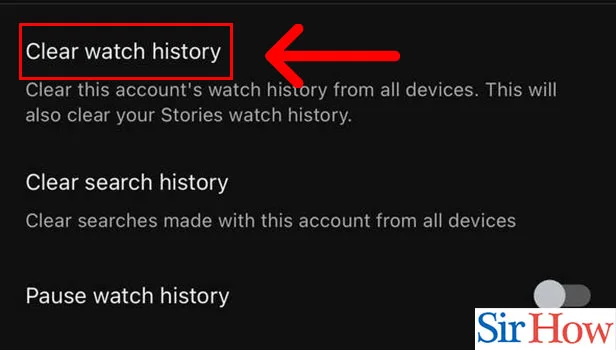
Image source: Bing (Web (fair-use with source credit))
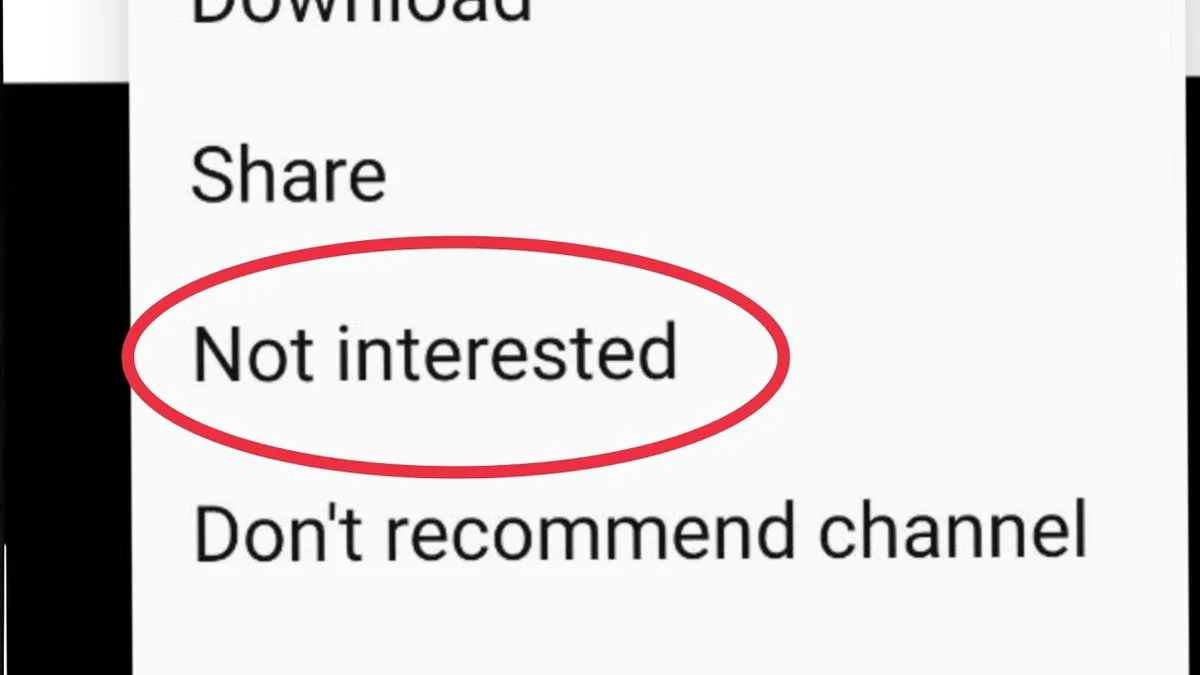
Image source: Bing (Web (fair-use with source credit))