
Press and hold the programming button. Enter your master code. Press 0 then the Lock button.
This clears all user codes. Then set a new master code. That's the core process for most electronic Kwikset locks.
If you have a SmartKey mechanical lock, you'll need the SmartKey tool instead.
Why You Might Need to Reset Your Kwikset Lock Code
Life happens. You move into a new house and the previous owner's code is still active. A locksmith used a temporary code and never came back to clear it.
Maybe you gave a friend access for a pet-sitting week, and now you want that code gone. Or the classic, you simply forgot the code you set last year.
Resetting your lock code is the fastest way to restore control. It's cheaper than calling a locksmith and faster than replacing the whole lock. As of 2026, Kwikset still uses the same core programming logic across most of its electronic models.
Once you learn the flow, you're set for years.
You'll need to know one thing before you start: which type of Kwikset lock you own. That single detail determines your entire reset path.
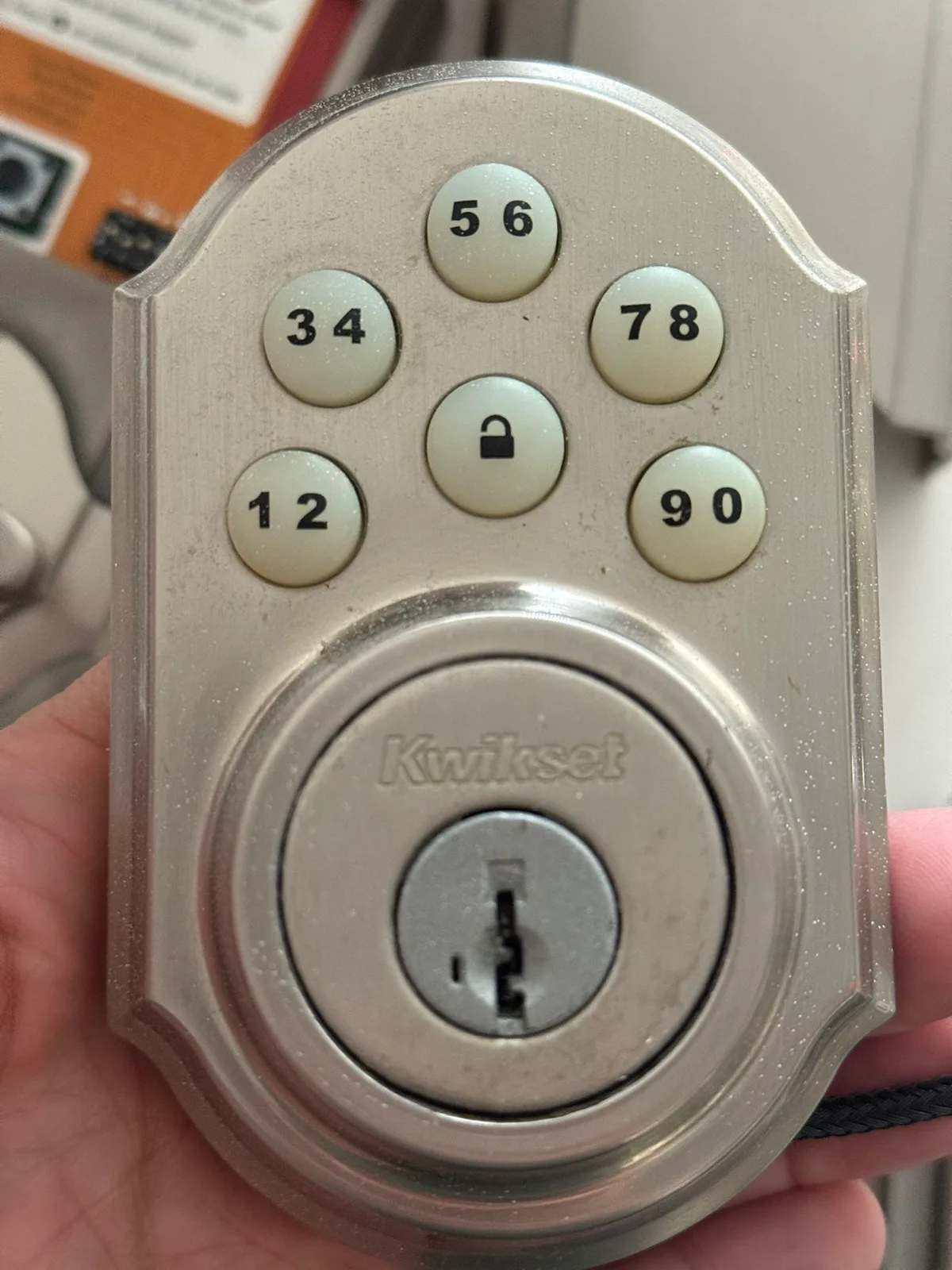
Know Your Model First – It Changes Everything
Kwikset makes two fundamentally different lock families. One has a keypad. The other doesn't.
Mix them up and you'll waste time trying to push buttons on a deadbolt that has none.
Electronic keypad models (SmartCode series)
These have a numbered keypad on the front and a programming button behind the interior battery cover. Examples: SmartCode 910, 914, 916, Obsidian, Kevo. They store multiple user codes and a master programming code.
Mechanical non-keypad models (SmartKey series)
These look like a standard deadbolt. No keypad, no batteries. Instead of a code, you use the SmartKey re-key tool to change which physical key opens the lock.
If you have a plain Kwikset deadbolt with a keyhole on both sides, you're looking at SmartKey.
How to check yours
Look at the lock face. If there's a keypad, it's electronic. If there's only a keyhole, it's SmartKey.
Still unsure? Pop off the interior cover (the part inside your house). Electronic models will have a battery compartment and a small round programming button.
SmartKey models will have a slot for a re-key tool.
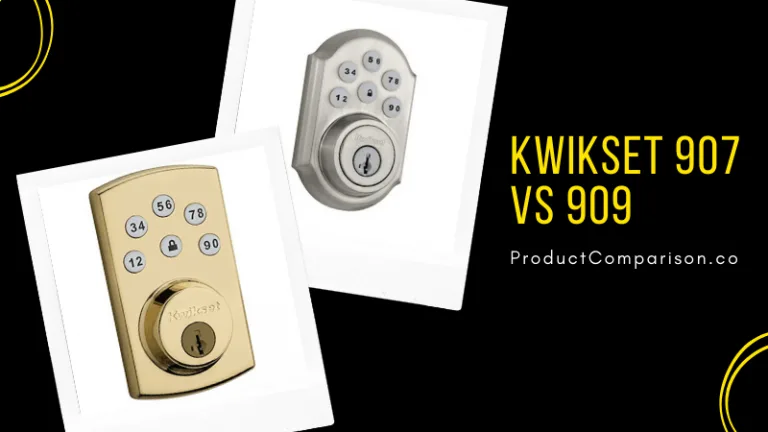
Quick Answer: Which Reset Path Fits Your Situation?
This is your decision tree. Answer three yes/no questions and you'll know exactly which path to take.
| Question | Yes → | No → |
|---|---|---|
| Does your lock have a keypad? | Go to Path A or B | Go to Path C (SmartKey) |
| Do you know your current master code? | Path A | Path B |
| Are you locked out (can't enter any code)? | Path B (with key override) | Path A |
Path A, You have the master code. Full reset in about 30 seconds.
Path B, You don't know the master code, or you're in lockout mode. You'll need to factory reset.
Path C, Mechanical SmartKey lock. You'll need the re-key tool to change the physical key.
If you're standing at your door right now, start with the model check. Then follow the path that fits.
How Kwikset Locks Handle Codes (Electronic vs. SmartKey)
Understanding the difference saves you from frustration.
Electronic locks store codes in a small memory chip. The master code is like an admin password, it lets you add or remove user codes. User codes are the ones you punch in to unlock the door.
If you lose the master code, you can still do a factory reset (Path B), but that wipes everything.
SmartKey locks don't store codes at all. They use a mechanical sidebar that matches the cuts on your key. To change the key, you insert a special SmartKey tool into a slot on the lock face, turn it, and slide in a new key.
No electronics, no batteries, no code to forget.
Both systems have the same end goal: control who can open your door. The method is just different.
Path A: You Have the Master Code (Electronic Keypad Models)
This is the easiest and fastest reset. You'll need the current master code. If you don't have it, skip to Path B.
What you need
- The lock's interior battery cover removed
- The programming button accessible
- Your current master code (factory default is usually 0000 or 1234)
Step-by-step
- Open the door and keep it open. Never attempt a code reset with the door closed and locked. You could accidentally lock yourself out.
- Remove the battery cover on the interior side of the lock.
- Press and hold the programming button until the lock beeps once and the LED flashes green. This takes about 3 to 5 seconds.
- Enter your current master code on the keypad, then press the Lock button (often a button with a padlock icon). The lock beeps twice.
- Press 0 and then the Lock button. This clears all stored user codes. The lock beeps twice again.
- Set a new master code. Enter your new master code (4 to 8 digits), then press the Lock button. The lock beeps once.
- Test it. Close the door and try the new code. If it works, you're done.
Adding user codes (optional)
You can add up to 8 user codes on most models. After step 6, press the programming button again, enter the master code, then enter the new user code (4 to 8 digits) followed by the Lock button. The lock beeps once.
Repeat for each additional code.
What if the lock doesn't beep? Check the batteries. Low voltage can cause the lock to ignore programming commands. Replace all four AA batteries with fresh alkalines.
Do not use lithium batteries, they can damage the electronics.
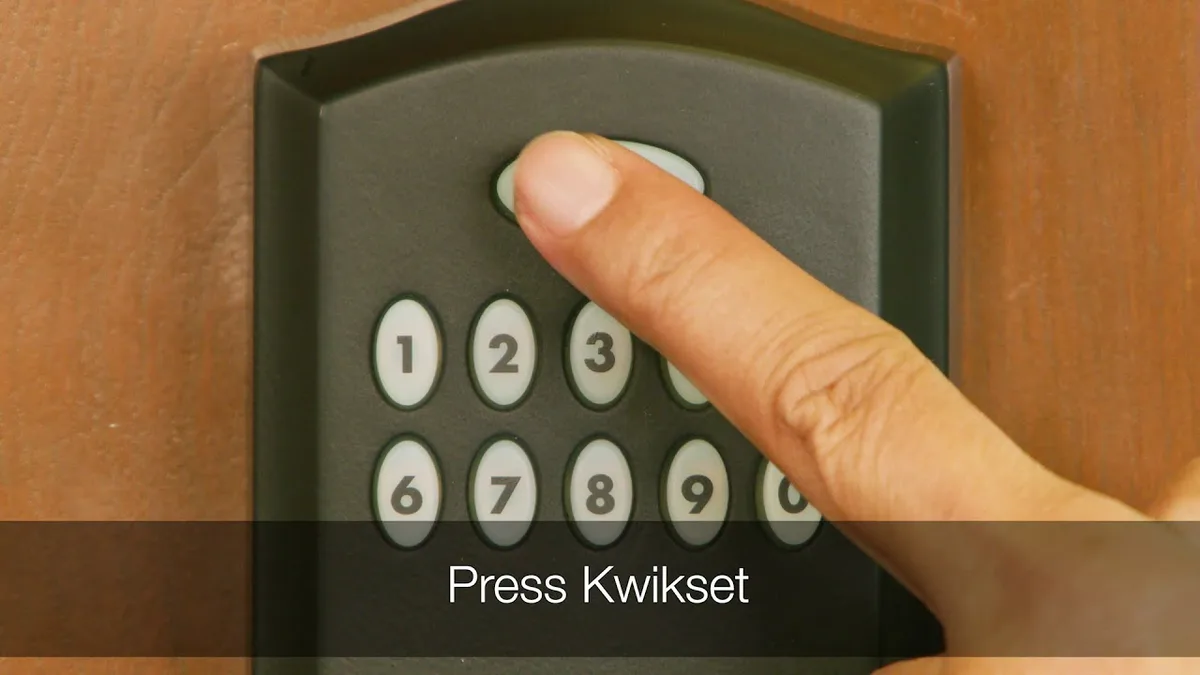
Common mistakes
- Forgetting to press the Lock button after entering a code
- Using a code that's too short (minimum 4 digits) or too long (maximum 8)
- Having the door closed during programming, you might get locked out if the code fails
- Using the same code as the old master code, the lock might reject it as unchanged
If you followed these steps and the lock still doesn't accept the new code, try a factory reset (Path B). That wipes everything and lets you start fresh.
Path B: You Don't Have the Master Code or You're Locked Out
You've forgotten the master code. Maybe you bought the house yesterday. Maybe the lock is beeping at you after ten wrong attempts.
Either way, you can't program a new code without the old one.
The good news: you can factory reset most electronic Kwikset locks without the master code.
The factory reset wipes every code stored in the lock. That includes the master code and all user codes. After the reset, the lock reverts to its factory default, usually master code 0-0-0-0.
Then you can set a new master code from scratch.
Before you start, check if the lock is in lockout mode. After ten incorrect code entries, the lock disables the keypad for one to three minutes. You'll hear a rapid series of beeps. Wait it out.
Do not keep entering codes during lockout, that resets the timer.
Factory reset steps for most SmartCode models
| Step | Action | What happens |
|---|---|---|
| 1 | Remove the battery cover on the interior side. | Battery pack exposed. |
| 2 | Press and hold the programming button. | LED flashes red, then green. |
| 3 | While holding the button, insert a fresh battery (or remove and reinsert one battery). | Lock beeps three times. |
| 4 | Release the programming button. | LED turns off. |
| 5 | Test the default master code: 0-0-0-0 (press Lock after). | Lock unlocks. |
Does this work on all electronic models? Not perfectly. Some older models (SmartCode 910, 909) use a slightly different sequence. For those, you may need to press and hold the programming button for 10 seconds without touching the battery.
The lock beeps and flashes, then resets. If the above method doesn't work, check Kwikset's official support page for your specific model number.
What if the lock has a key override and you're locked out? Use your physical key to unlock the door first. Then keep the door open and perform the factory reset. Never attempt a reset with the door closed and locked.
Still stuck? You can always call a locksmith. But try the factory reset first. It's free and takes under a minute.
Path C: Mechanical SmartKey Reset (Non-Electronic Models)
If your Kwikset lock has no keypad and no batteries, you're dealing with a SmartKey lock. These are popular on side doors, garages, and rental properties. They're simple, reliable, and never need battery changes.
You don't reset a code with SmartKey. You re-key the lock. That means you change which physical key works. The same lock body stays in place.
You just install a new key and the old key stops working.
What you need
- The current working key (must be able to lock/unlock the door)
- The SmartKey re-key tool that came with the lock
- A new Kwikset key (or one of your existing keys you want to use instead)
Step-by-step SmartKey re-key
- Insert the current key into the lock and turn it 90 degrees clockwise. The lock should be in the locked position with the key turned to the "remove key" position.
- Insert the SmartKey tool into the small slot on the face of the lock (usually beside the keyhole). Push it in until it clicks. The lock is now in "learn" mode.
- Remove the current key. Leave the SmartKey tool in place.
- Insert the new key into the keyhole. Push it all the way in.
- Turn the new key 90 degrees counterclockwise to the unlocked position. Remove the SmartKey tool.
- Test the new key. It should lock and unlock the door. The old key should no longer work.
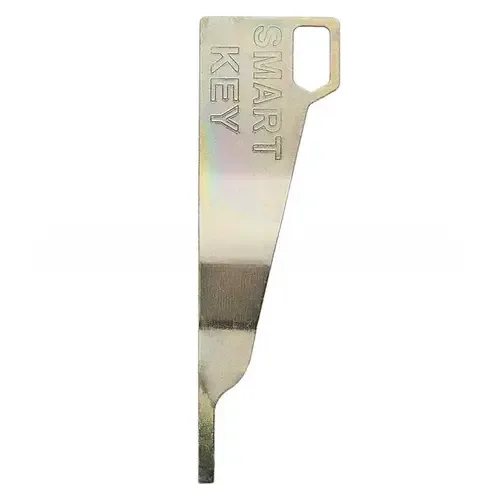
What if you don't have the SmartKey tool? You can buy a replacement from Kwikset or most hardware stores. The tool is model-specific, so check your lock's packaging. Some locks use a small metal tool, others use a plastic one.
Can you re-key without the current key? No. The lock must be in the locked position with the key turned to the correct angle. If you lost the only key, you'll need a locksmith to drill the lock or pick it open.
Mistakes That Can Lock You Out (and How to Avoid Them)
Resetting a Kwikset lock seems simple. But small errors can leave you stuck outside your own house. Here are the most common traps and how to sidestep them.
Mistake 1: Resetting with the door closed.
You follow the steps perfectly. Then the lock beeps and refuses to accept the new code. Now the door is locked and you're on the wrong side.
Always prop the door open before starting any reset.
Mistake 2: Using the wrong model sequence.
A SmartKey lock doesn't have a programming button. An electronic lock doesn't have a re-key tool slot. Trying the wrong method wastes time.
Double-check your model before you start.
Mistake 3: Not clearing old user codes.
After a factory reset, the lock reverts to default. But if you skip step 5 in Path A (press 0 then Lock), the old user codes may remain active. Someone with an old code could still get in.
Always clear all codes, then add only the ones you want.
Mistake 4: Using the wrong battery type.
Lithium batteries can damage Kwikset electronic locks. Stick to alkaline AA batteries. Replace all four at once, even if only one seems dead.
Mixed battery voltages cause erratic behavior.
Mistake 5: Ignoring lockout mode.
Entering wrong codes repeatedly triggers a lockout period. During lockout, the keypad ignores all input. Wait the full one to three minutes before trying again.
Don't hold the button down, that doesn't speed anything up.
Mistake 6: Forgetting to test the new code before closing the door.
You think you set it. You close the door. Then the code doesn't work.
Now you're locked out with a key inside. Test the code three times with the door open before you commit.
Expert Tips: Battery Check, Door Position, and Code Storage
A few small habits make lock resets easier and keep your lock working longer.
Battery health matters more than you think.
Low voltage is the number one cause of programming failures. If the lock beeps weakly or the keypad backlight flickers, change the batteries. Use fresh alkaline AA batteries.
Manufacturer specifications clearly state that lithium and rechargeable batteries can cause voltage fluctuations that interfere with the lock's memory chip.
Door position is non-negotiable.
Keep the door open during any reset or programming step. This is the single most important safety rule. Even if you're sure the code works, test it with the door open.
Close it only after you've confirmed the code unlocks the latch.
Write down your master code. Store it safely.
You can tape it inside the battery compartment (under the cover). You can save it in a password manager. Just don't rely on memory alone.
If you lose the master code, you'll need to factory reset, which wipes all user codes.
Label the back of the lock with the model number.
Use a permanent marker on the interior housing. That way, if you need to look up instructions later, you won't have to disassemble the lock to find the model number. This is especially helpful for landlords who manage multiple properties.
Schedule a yearly battery change.
Set a reminder on your phone. Replace all four batteries every 12 months, even if they seem fine. This prevents lockout from dead batteries.
It also keeps the lock responsive during programming.
Use user codes wisely.
Give each person a unique code. That way, if a code is shared or compromised, you can delete just that one without resetting everything. Kwikset locks support 4 to 8 user codes depending on the model.
Frequently Asked Questions
How many codes can I store on a Kwikset lock?
Most electronic models store 4 to 8 user codes plus one master code. The SmartCode 910 stores 4. The SmartCode 914 and 916 store 8.
Check your manual for exact capacity.
What is the factory default master code?
For almost all Kwikset electronic locks, the factory default master code is 0-0-0-0. Some older models use 1-2-3-4. After a factory reset, the lock returns to that default.
Will a factory reset delete all user codes?
Yes. A factory reset removes every stored code, including the master code and all user codes. After the reset, you must set a new master code and add any user codes again.
Can I reset a Kwikset lock without removing the battery cover?
No. You need access to the programming button behind the battery cover to initiate a reset. For a SmartKey lock, you need the re-key tool, not the battery cover.
How do I know if my Kwikset lock uses SmartKey or SmartCode?
Look for a keypad on the exterior side. If there's a keypad, it's SmartCode (electronic). If there's only a keyhole, it's SmartKey (mechanical).
Also check the interior: electronic models have a battery compartment and programming button.
What should I do if my lock beeps but won't accept any code?
First, wait out any lockout period (1-3 minutes). Then replace the batteries with fresh alkaline AA. If it still beeps without accepting codes, perform a factory reset (Path B).
If that fails, the lock may have a hardware fault and need replacement.
Decision Guide – Choose Your Reset Path at a Glance
You've read through all the options. Now it's time to pick one. Use this quick-reference table to match your exact situation to the right process.
| Your situation | Start here | Time needed | Tools required |
|---|---|---|---|
| Electronic lock, know the master code | Path A | 30 seconds | None |
| Electronic lock, forgot master code | Path B | 1 minute | Fresh AA battery |
| Electronic lock, locked out (beeping) | Path B | 3 minutes (wait for lockout to end) | Fresh AA battery |
| Mechanical lock (no keypad), have current key | Path C | 2 minutes | SmartKey re-key tool, new key |
| Mechanical lock, lost all keys | Call a locksmith | N/A | Special tools |
| Smart lock (Kevo) | Use the Kevo app | 2 minutes | Smartphone, app installed |
If you're still unsure after reading the table, ask yourself one question: Does your lock have a keypad? If yes, go with Path A or B. If no, go with Path C.
That single decision covers 95 percent of cases.
For landlords or property managers: Keep a record of which properties use SmartKey and which use SmartCode. Write the model number on the interior cover. This saves hours of troubleshooting when a tenant moves out and you need to reset the lock.
What to Do If Your Lock Still Doesn't Work
You followed every step. The lock beeped when it should. But the code still won't open the door.
A few common issues cause this.
Check the batteries first. Low voltage is the most frequent culprit. Replace all four AA alkalines with fresh ones. Even if the lock still beeps, weak batteries can corrupt the programming sequence.
After replacing, repeat the reset from the beginning.
Verify you're using the correct master code. After a factory reset, the default is 0-0-0-0. If that doesn't work, try 1-2-3-4. Some older models shipped with that alternate default.
If neither works, the lock may not have fully reset. Repeat the factory reset, holding the programming button for a full 10 seconds.
Check the lock's alignment. A misaligned deadbolt can prevent the latch from fully retracting. The lock might beep and flash, but the bolt sticks. Loosen the screws on the strike plate slightly, then tighten them again with the door closed.
This realigns the mechanism.
Inspect the wiring. On electronic models, a loose wire between the interior and exterior components can cause intermittent failures. Remove the interior cover and check that the connector is fully seated. Push it in until you feel it click.
Try a hard reset by removing all batteries. Take out all four batteries. Press and hold the programming button for 5 seconds to drain residual charge. Wait 30 seconds.
Reinsert fresh batteries. Then perform the factory reset procedure from Path B. This clears the lock's memory completely.
When to Call a Locksmith
Sometimes DIY isn't the answer. Call a professional if any of these apply.
You lost the only physical key for a SmartKey lock. The SmartKey system requires a working key to re-key. Without one, a locksmith must pick the lock or drill it out. That's not a job for beginners.
The lock is physically damaged. If the keypad is cracked, the deadbolt won't turn, or the interior mechanism feels gritty, a reset won't fix hardware failure. Replacement is often cheaper than repair.
You've tried all the steps and the lock still won't respond. Repeated attempts can wear out the programming button or the circuit board. A locksmith can diagnose whether the lock is salvageable.
You need to re-key multiple locks to match one key. Locksmiths have the tools to re-pin cylinders quickly. Doing it yourself with a SmartKey kit works for one lock but gets tedious for a whole house.
Average locksmith costs range from $50 to $150 for a service call, plus $15 to $30 per lock for re-keying. Compare that to a new Kwikset lock at $30 to $80. Sometimes replacement is cheaper, especially if the lock is more than five years old.
How to Prevent Future Lockout Issues
A little planning keeps you from standing outside in the rain with a dead lock.
Store a backup key off-site. Give a spare to a trusted neighbor or keep one in a lockbox. If you ever lock yourself out or the code fails, you have a fallback.
Use the lock's temporary code feature. Many Kwikset models let you set a one-time code that expires after a single use. Use this for contractors, cleaners, or guests. Delete it as soon as the visit ends.
Keep a written record of your master code. Tape it inside the battery compartment or store it in your phone's password manager. Do not rely on memory alone. If you forget, you'll need to factory reset and lose all user codes.
Test your lock once a month. Enter the master code and verify it works. Enter each user code. If any fail, catch the problem early before you're locked out.
Set a calendar reminder to change batteries every 12 months. Use the same date each year, like your birthday or New Year's Day. Fresh batteries prevent low-voltage programming failures.
Kwikset Lock Maintenance Schedule
A little care goes a long way. Follow this annual schedule to keep your lock working reliably.
| Frequency | Task | Why |
|---|---|---|
| Every 12 months | Replace all 4 AA alkaline batteries | Prevents low-voltage failures and programming errors |
| Every 6 months | Clean the keypad with a dry cloth | Dirt and grime can cause missed key presses |
| Every 12 months | Lubricate the deadbolt latch with graphite powder | Reduces friction and prevents sticking |
| Every 12 months | Tighten all mounting screws | Locks loosen over time; loose screws cause misalignment |
| Every 2 years | Factory reset and reprogram codes | Clears any corrupted memory and removes old temporary codes |
| As needed | Replace batteries if keypad backlight dims | Weak batteries cause erratic behavior |
Use only graphite powder for lubrication. Never use oil-based lubricants like WD-40. Oil attracts dust and gums up the lock mechanism. Graphite stays dry and won't collect debris.
When tightening screws, don't overtighten. Stripped screw holes are a common failure point. Turn until snug, then stop. If a screw feels loose, use a longer screw or fill the hole with a wood toothpick and glue.
That's the complete guide to resetting your Kwikset lock code. Start with your model check, pick your path, and you'll be back inside in minutes.